As of Bootstrap 4.2, toasts have been introduced and the aim of this plugin is to make them easier to use.
Modify the global variables to apply specific rules/styles to all your toasts.
$.toastDefaults={position: 'top-right',/** top-left/top-right/top-center/bottom-left/bottom-right/bottom-center - Where the toast will show up **/dismissible: true,/** true/false - If you want to show the button to dismiss the toast manually **/stackable: true,/** true/false - If you want the toasts to be stackable **/pauseDelayOnHover: true,/** true/false - If you want to pause the delay of toast when hovering over the toast **/style: {toast: '',/** Classes you want to apply separated my a space to each created toast element (.toast) **/info: '',/** Classes you want to apply separated my a space to modify the "info" type style **/success: '',/** Classes you want to apply separated my a space to modify the "success" type style **/warning: '',/** Classes you want to apply separated my a space to modify the "warning" type style **/error: '',/** Classes you want to apply separated my a space to modify the "error" type style **/}};A "snack" is a bitesized "toast".
$.snack(type,title,delay)
Note: The final argument delay is omitable. If omitted, the toast will remain forever.
$.toast({type: 'info',title: 'Notice!',subtitle: '11 mins ago',content: 'Hello, world! This is a toast message.',delay: 5000,img: {src: 'https://via.placeholder.com/20',class: 'rounded-0',/** Classes you want to apply separated my a space to modify the image **/alt: 'Image'}});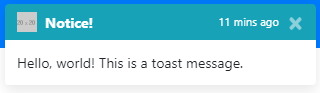
Feel free to contribute in any of the ways outlined:
- Submit issues/pull requests
- Tell us how you're using this plugin in your project