To demonstrate Java Native Types in action we've ported the Swift TechStacks iOS App to a native Java Android App to showcase the responsiveness and easy-of-use of leveraging Java Add ServiceStack Reference in Android Projects.
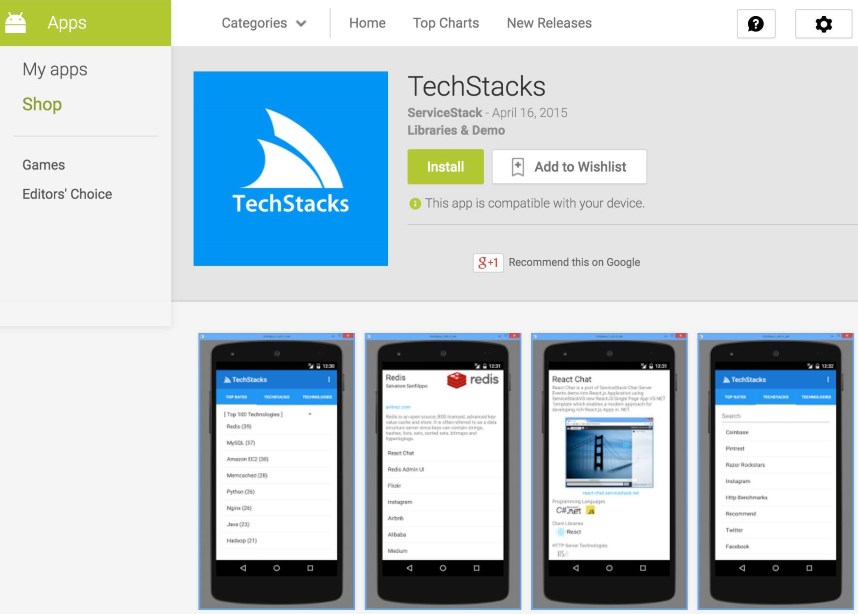
The Android TechStacks App can be downloaded for free from the Google Play Store:
As there's no formal data-binding solution in Android we've adopted a lightweight iOS-inspired Key-Value-Observable-like data-binding solution in Android TechStacks in order to maximize knowledge-sharing and ease porting between native Swift iOS and Java Android Apps.
Similar to the Swift TechStacks iOS App, all web service requests are encapsulated in a single App.java class and utilizes Async Service Client API's in order to maintain a non-blocking and responsive UI.
In iOS, UI Controllers register for UI and data updates by implementing *DataSource and *ViewDelegate protocols, following a similar approach, Android Activities and Fragments register for Async Data callbacks by implementing the Custom interface AppDataListener below:
publicstaticinterfaceAppDataListener{publicvoidonUpdate(AppDatadata, DataTypedataType)}Where Activities or Fragments can then register itself as a listener when they're first created:
@OverridepublicvoidonCreate(BundlesavedInstanceState){super.onCreate(savedInstanceState); App.getData().addListener(this)}Then in onCreateView MainActivity calls the AppData singleton to fire off all async requests required to populate it's UI:
publicViewonCreateView(LayoutInflaterinflater, ViewGroupcontainer, Bundlestate){App.getData().loadAppOverview(); ... }Where loadAppOverview() makes an async call to the AppOverview Service, storing the result in an AppData instance variable before notifying all registered listeners that DataType.AppOverview has been updated:
publicAppDataloadAppOverview(){client.getAsync(newAppOverview(), newAsyncResult<AppOverviewResponse>(){@Overridepublicvoidsuccess(AppOverviewResponseresponse){appOverviewResponse = response; onUpdate(DataType.AppOverview)} }); returnthis}Returning
thisallows expression chaining, reducing the boilerplate required to fire off multiple requests
Calling onUpdate() simply invokes the list of registered listeners with itself and the enum DataType of what was changed, i.e:
publicvoidonUpdate(DataTypedataType){for (AppDataListenerlistener : listeners){listener.onUpdate(this, dataType)} }The Activity can then update its UI within the onUpdate() callback by re-binding its UI Controls when relevant data has changed, in this case when AppOverview response has returned:
@OverridepublicvoidonUpdate(App.AppDatadata, App.DataTypedataType){switch (dataType){caseAppOverview: Spinnerspinner = (Spinner)getActivity().findViewById(R.id.spinnerCategory); ArrayList<String> categories = map(data.getAppOverviewResponse().getAllTiers(), newFunction<Option, String>(){@OverridepublicStringapply(Optionoption){returnoption.getTitle()} }); spinner.setAdapter(newArrayAdapter<>(getActivity(), android.R.layout.simple_spinner_item, categories)); ListViewlist = (ListView)getActivity().findViewById(R.id.listTopRated); ArrayList<String> topTechnologyNames = map(getTopTechnologies(data), newFunction<TechnologyInfo, String>(){@OverridepublicStringapply(TechnologyInfotechnologyInfo){returntechnologyInfo.getName() + " (" + technologyInfo.getStacksCount() + ")"} }); list.setAdapter(newArrayAdapter<>(getActivity(), android.R.layout.simple_list_item_1, topTechnologyNames)); break} }In this case the MainActivity home screen re-populates the Technology Category Spinner (aka Picker) and the Top Technologies ListView controls by assigning a new Android ArrayAdapter.
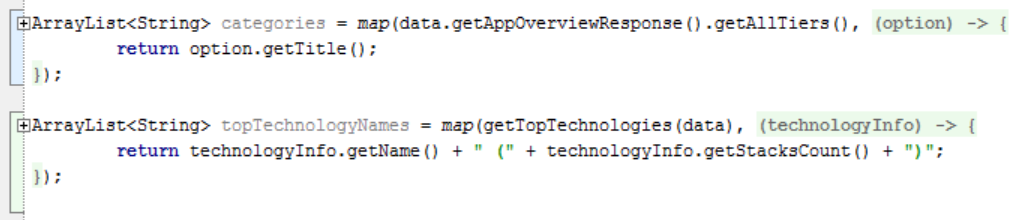
The above example also introduces the map() functional util we've also included in the net.servicestack:client dependency to allow usage of Functional Programming techniques to transform, query and filter data given Android's Java 7 lack of any language or library support for Functional Programming itself. Unfortunately lack of closures in Java forces more boilerplate than otherwise would be necessary as it needs to fallback to use anonymous Type classes to capture delegates. Android Studio also recognizes this pattern as unnecessary noise and will automatically collapse the code into a readable closure syntax, with what the code would've looked like had Java supported closures, e.g:
Func.java API
The Func.java static class contains a number of common functional API's providing a cleaner and more robust alternative to working with Data than equivalent imperative code. We can take advantage of static imports in Java to import the namespace of all utils with the single import statement below:
importstaticnet.servicestack.client.Func.*;Which will let you reference all the Functional utils below without a Class prefix:
ArrayList<R> map(Iterable<T> xs, Function<T,R> f) ArrayList<T> filter(Iterable<T> xs, Predicate<T> predicate) voideach(Iterable<T> xs, Each<T> f) Tfirst(Iterable<T> xs) Tfirst(Iterable<T> xs, Predicate<T> predicate) Tlast(Iterable<T> xs) Tlast(Iterable<T> xs, Predicate<T> predicate) booleancontains(Iterable<T> xs, Predicate<T> predicate) ArrayList<T> skip(Iterable<T> xs, intskip) ArrayList<T> skip(Iterable<T> xs, Predicate<T> predicate) ArrayList<T> take(Iterable<T> xs, inttake) ArrayList<T> take(Iterable<T> xs, Predicate<T> predicate) booleanany(Iterable<T> xs, Predicate<T> predicate) booleanall(Iterable<T> xs, Predicate<T> predicate) ArrayList<T> expand(Iterable<T>... xss) TelementAt(Iterable<T> xs, intindex) ArrayList<T> reverse(Iterable<T> xs) reduce(Iterable<T> xs, EinitialValue, Reducer<T,E> reducer) EreduceRight(Iterable<T> xs, EinitialValue, Reducer<T,E> reducer) Stringjoin(Iterable<T> xs, Stringseparator) ArrayList<T> toList(Iterable<T> xs)The TechStacks Android App also takes advantage of the Custom Service Client API's to download images asynchronously. As images can be fairly resource and bandwidth intensive they're stored in a simple Dictionary Cache to minimize any unnecessary CPU and network resources, i.e:
HashMap<String,Bitmap> imgCache = newHashMap<>(); publicvoidloadImage(finalStringimgUrl, finalImageResultcallback){Bitmapimg = imgCache.get(imgUrl); if (img != null){callback.success(img); return} client.getAsync(imgUrl, newAsyncResult<byte[]>(){@Overridepublicvoidsuccess(byte[] imgBytes){Bitmapimg = AndroidUtils.readBitmap(imgBytes); imgCache.put(imgUrl, img); callback.success(img)} })}The TechStacks App uses the above API to download screenshots and load their Bitmaps in ImageView UI Controls, e.g:
StringimgUrl = result.getScreenshotUrl(); finalImageViewimg = (ImageView)findViewById(R.id.imgTechStackScreenshotUrl); data.loadImage(imgUrl, newApp.ImageResult(){@Overridepublicvoidsuccess(Bitmapresponse){img.setImageBitmap(response)} });