
In this Computer Vision project we have used ARUco Markers backed by OpenCV to augment any 2D/3D image on any physical object .
The OpenCV tracks the ARUco markers present in the input frame → Mark the bounding frame around it → Augments the provided image on that bounding frame.
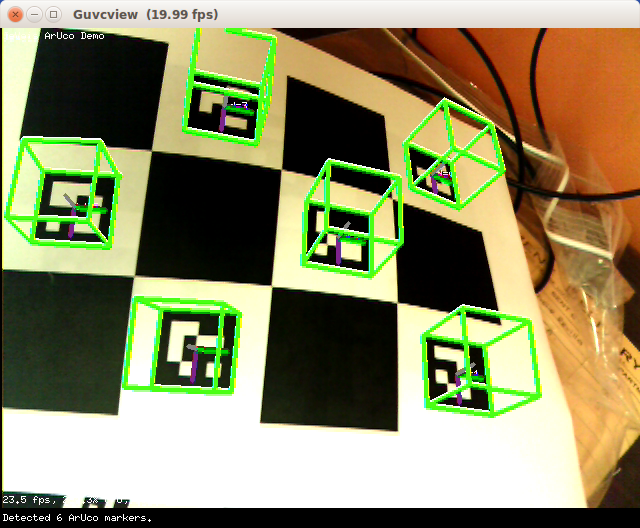
This overall process is made possible using advanced image processing techniques like Homography and Image Masking.
This tracking & masking is done in real-time, so as a rendered product it seems that there is no ARUco marker. Instead there is a 3D Model itself. Please have a look at the working demo in below section.
#AR #OpenCV
- AR implementation in Python 🔥
- Realtime masking of image 🖼️
- Good accuracy with ARUco Markers 📈
- Python
- OpenCV


Click on the image below to see the working demo of the project.


Clone the repository on your system
git clone https://github.com/tirth-2001/Augmented-Reality-using-Python.gitOr direct download ZIP file in your system
For running the project, first make a playcard which has respective ARUco Marker pasted on it. Take reference from the video shown in the demo section above.
Go to the project folder in which
ar_python.pyfile is present. Open it , and check the relative path for reference marker, images to augment etc.For running the code, install the dependencies mentioned in the
requirements.txtfile.Finally, if everything is ready and installed, execute the
ar_python.pyfile and you will see the window which shows the augmented mask on your playcard frame.
- Interested?
- Cloned?
- Starred the Repo?
Thanks for showing interest in this project. In case if you face any bugs while implementing this project, feel free to contact me. I'll we happy to help you out.