
The Riak Java Client enables communication with Riak, an open source, distributed database that focuses on high availability, horizontal scalability, and predictable latency. Both Riak and this code are maintained by Basho.
The latest version of the Java client supports both Riak KV 2.0+, and Riak TS 1.0+. Please see the Release Notes for more information on specific feature and version support.
This branch of the Riak Java Client is for the new v2.0 client, to be used with Riak 2.0.
Previous versions:
riak-client-1.4.4 - For use with Riak 1.4.x
riak-client-1.1.4 - For use with < Riak 1.4.0
This client is published to Maven Central and can be included in your project by adding:
<dependencies> <dependency> <groupId>com.basho.riak</groupId> <artifactId>riak-client</artifactId> <version>2.0.7</version> </dependency> ... </dependencies>All-in-one jar builds are available here for those that don't want to set up a maven project.
- Develop:

Most documentation is living in the wiki. For specifics on our progress here, see the release notes.
Also see the Javadoc site for more in-depth API docs.
We've included Basho's riak-client-tools as a git submodule to help with Riak test setup and teardown. You can find these tools in the /tools subdirectory.
To configure your single riak instance, you may use the setup-riak script to setup the node with the appropriate bucket types. You can use it by running ./tools/setup-riak.
To configure a devrel for multiple node testing, please see the instructions located at basho/riak-client-tools on how to use the ./tools/setup-riak command with your devrel.
To run the Riak KV integration test suite, execute:
make RIAK_PORT=8087 integration-test To run the Riak TimeSeries test suite, execute:
make RIAK_PORT=8087 integration-test-timeseries When running tests directly from Maven, you may also turn feature sets on and off with system properties:
mvn -Pitest,default -Dcom.basho.riak.timeseries=true -Dcom.basho.riak.pbcport=$(RIAK_PORT) verify The supported test flags are:
| System Property | Default Value | Note |
|---|---|---|
| com.basho.riak.buckettype | true | Riak KV 2.0 Bucket Type Tests |
| com.basho.riak.yokozuna | true | Riak KV 2.0 Solr/Yokozuna Search Tests |
| com.basho.riak.2i | true | Riak KV Secondary Index Tests |
| com.basho.riak.mr | true | Riak KV MapReduce Tests |
| com.basho.riak.crdt | true | Riak KV 2.0 Data Type Tests |
| com.basho.riak.lifecycle | true | Java Client Node/Cluster Lifecycle Tests |
| com.basho.riak.timeseries | false | Riak TS TimeSeries Tests |
| com.basho.riak.riakSearch | false | Riak KV 1.0 Legacy Search Tests |
| com.basho.riak.coveragePlan | false | Riak KV/TS Coverage Plan Tests (need cluster to run these ) |
| com.basho.riak.security | false | Riak Security Tests |
| com.basho.riak.clientcert | false | Riak Security Tests with Certificates |
To run the HyperLogLog or GSet Data Type tests, you must have two test bucket types setup as following:
riak-admin bucket-type create gsets '{"props":{"allow_mult":true, "datatype": "gset"}}' riak-admin bucket-type create hlls '{"props":{"allow_mult":true, "datatype": "hll"}}' riak-admin bucket-type activate gsets riak-admin bucket-type activate hlls Some tests may require more than one feature to run, so please check the test to see which ones are required before running.
Connection Options
| System Property | Default Value | Note |
|---|---|---|
| com.basho.riak.host | 127.0.0.1 | The hostname to connect to for tests |
| com.basho.riak.pbcport | 8087 | The Protocol Buffers port to connect to for tests |
To run the security-related integration tests, you will need to:
- Setup the certs by running the buildbot makefile's
configure-security-certstarget.
cd buildbot; make configure-security-certs; cd ../; - Copy the certs to your Riak's etc dir, and configure the riak.conf file to use them.
resources_dir=./src/test/resources riak_etc_dir=/fill/in/this/path/ # Shell cp $resources_dir/cacert.pem $riak_etc_dir cp $resources_dir/riak-test-cert.pem $riak_etc_dir cp $resources_dir/riakuser-client-cert.pem $riak_etc_dir # riak.conf file additions ssl.certfile = (riak_etc_dir)/cert.pem ssl.keyfile = (riak_etc_dir)/key.pem ssl.cacertfile = (riak_etc_dir)/cacert.pem - Enable Riak Security.
riak-admin security enable - Create a user "riakuser" with the password "riak_cert_user" and configure it with certificate as a source
riak-admin security add-user riakuser riak-admin security add-source riakuser 0.0.0.0/0 certificate - Create a user "riak_trust_user" with the password "riak_trust_user" and configure it with trust as a source.
riak-admin security add-user riak_trust_user password=riak_trust_user riak-admin security add-source riak_trust_user 0.0.0.0/0 trust - Create a user "riakpass" with the password "riak_passwd_user" and configure it with password as a source.
riak-admin security add-user riakpass password=Test1234 riak-admin security add-source riakpass 0.0.0.0/0 password - Run
integration-test-securitytarget of the makefile.
make integration-test-security This repository's maintainers are engineers at Basho and we welcome your contribution to the project! Review the details in CONTRIBUTING.md in order to give back to this project.
Due to our obsession with stability and our rich ecosystem of users, community updates on this repo may take a little longer to review.
The most helpful way to contribute is by reporting your experience through issues. Issues may not be updated while we review internally, but they're still incredibly appreciated.
Thank you for being part of the community!
TODO
The Riak Java Client is Open Source software released under the Apache 2.0 License. Please see the LICENSE file for full license details.
- Author: Alex Moore
- Author: Brian Roach
- Author: Chris Mancini
- Author: David Rusek
- Author: Sergey Galkin
Thank you to all of our contributors! If your name is missing please let us know.
Version 2.0 of the Riak Java client is a completely new codebase. It relies on Netty4 in the core for handling network operations and all operations can be executed synchronously or asynchronously.
The new client is designed to model a Riak cluster:
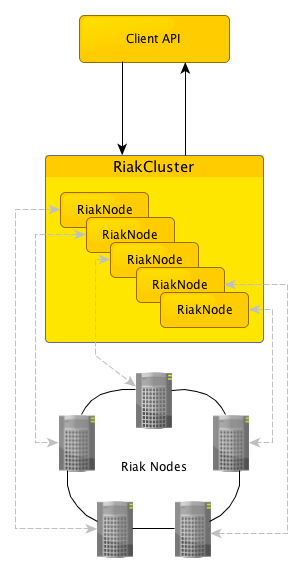
The easiest way to get started with the client is using one of the static methods provided to instantiate and start the client:
RiakClientclient = RiakClient.newClient("192.168.1.1","192.168.1.2","192.168.1.3");The RiakClient object is thread safe and may be shared across multiple threads.
For more complex configurations, you can instantiate a RiakCluster from the core packages and supply it to the RiakClient constructor.
RiakNode.Builderbuilder = newRiakNode.Builder(); builder.withMinConnections(10); builder.withMaxConnections(50); List<String> addresses = newLinkedList<String>(); addresses.add("192.168.1.1"); addresses.add("192.168.1.2"); addresses.add("192.168.1.3"); List<RiakNode> nodes = RiakNode.Builder.buildNodes(builder, addresses); RiakClustercluster = newRiakCluster.Builder(nodes).build(); cluster.start(); RiakClientclient = newRiakClient(cluster)Once you have a client, commands from the com.basho.riak.client.api.commands.* packages are built then executed by the client.
Some basic examples of building and executing these commands is shown below.
Namespacens = newNamespace("default", "my_bucket"); Locationlocation = newLocation(ns, "my_key"); RiakObjectriakObject = newRiakObject(); riakObject.setValue(BinaryValue.create("my_value")); StoreValuestore = newStoreValue.Builder(riakObject) .withLocation(location) .withOption(Option.W, newQuorum(3)).build(); client.execute(store);Namespacens = newNamespace("default","my_bucket"); Locationlocation = newLocation(ns, "my_key"); FetchValuefv = newFetchValue.Builder(location).build(); FetchValue.Responseresponse = client.execute(fv); RiakObjectobj = response.getValue(RiakObject.class);A bucket type must be created (in all local and remote clusters) before 2.0 data types can be used. In the example below, it is assumed that the type "my_map_type" has been created and associated to the "my_map_bucket" prior to this code executing.
Once a bucket has been associated with a type, all values stored in that bucket must belong to that data type.
Namespacens = newNamespace("my_map_type", "my_map_bucket"); Locationlocation = newLocation(ns, "my_key"); RegisterUpdateru1 = newRegisterUpdate(BinaryValue.create("map_value_1")); RegisterUpdateru2 = newRegisterUpdate(BinaryValue.create("map_value_2")); MapUpdatemu = newMapUpdate(); mu.update("map_key_1", ru1); mu.update("map_key_2", ru2); UpdateMapupdate = newUpdateMap.Builder(location, mu).build(); client.execute(update);