⚠️ V1 is not maintained anymore, check the V2 on: https://github.com/molteo-engineering-team/Dash-Chat-2⚠️
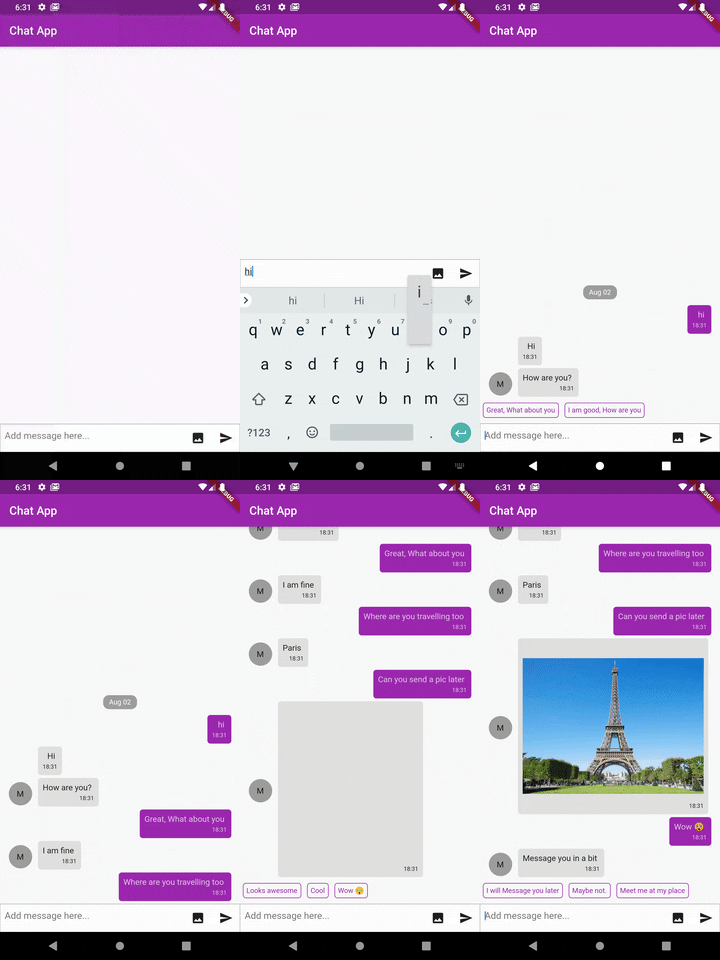
Inspired by react-native-gifted-chat. Highly customizable and helps developing chat UI faster.
To use this package, add dash_chat as a dependency in your pubspec.yaml file.
- Fully customizable components
- Copy messages to clipboard
- Multi-line TextInput
- Touchable links using flutter_parsed_text
- Avatar as user's initials
- Quick Reply messages
- Load earlier messages
- Scroll to bottom Widget
- Composer actions (to attach photos, etc.) - WIP
example, Chat Message
ChatMessage( text:"Hello", user:ChatUser( name:"Fayeed", uid:"123456789", avatar:"https://www.wrappixel.com/ampleadmin/assets/images/users/4.jpg", ), createdAt:DateTime.now(), image:"http://www.sclance.com/images/picture/Picture_753248.jpg", );example, Chat Message with Quick Replies
ChatMessage( text:"This is a quick reply example.", user:ChatUser(), createdAt:DateTime.now(), quickReplies:QuickReplies( values:<Reply>[ Reply( title:"😋 Yes", value:"Yes", ), Reply( title:"😞 Nope. What?", value:"no", ), ], ), ),messageContainerFlex(int) - Flex value for the messeage container defaults to1height(double) - Height for the Dash chat Widget.width(double) - Width for the Dash chat Widget.messages(List) - List of messages to display in the chat.text(String) - [optional parameter] If provided will stop using the default controller.onTextChange(Function(String)) - If the text parameter is passed then onTextChange must also be passed.inputDecoration(InputDecoration) - Used to provide input decoration to the text.messageIdGenerator(String Function) - Usually new message added by the user gets UUID v4 String generater by uuid.user(ChatUser) - The current user object.
DashChat( user:ChatUser( name:"Jhon Doe", uid:"xxxxxxxxx", avatar:"https://www.wrappixel.com/ampleadmin/assets/images/users/4.jpg", ) );onSend(Function(ChatMessage)) - Callback when sending a message.alwaysShowSend(bool) - Should the send button be always active defaults to false.avatarMaxSize(double) - Sets the default Avatar's max size, default is30.0.dateFormat(DateFormat) - Format to use for rendering date default isyyyy-MM-dd.timeFormat(DateFormat) - Format to use for rendering time default isHH:mm:ss.showUserAvatar(bool) - Should the user avatar be shown.showAvatarForEveryMessage(bool) - Should the avatar be shown for every message defaults to false.onPressAvatar(Function(ChatUser)) - Callback funtion when avatar is tapped on.onLongPressAvatar(Function(ChatUser)) - Callback funtion when avatar is long pressed on.onLongPressMessage(Function(ChatUser)) - Callback funtion when message is long pressed on.inverted(bool) - Should the messages be shown in reversed orderavatarBuilder(Widget Function(ChatUser)) - Will override the the default avatar.messageBuilder(Widget Function(ChatMessage)) - Will override the the default message widget.messageTextBuilder(Widget Function(String)) - Will override the the default message text widget.messageImageBuilder(Widget Function(String)) - Will override the the default message imaeg widgetmessageTimeBuilder(Widget Function(String)) - Will override the the default message time widget.dateBuilder(Widget Function(String)) - Will override the the default chat view date widget.sendButtonBuilder(Widget Function(Function)) - Will override the the default send button widget.chatFooterBuilder(Widget Function) - A Widget that will be shown below the MessageListView like you can a "tying..." Text Widget at the end.inputFooterBuilder(Widget Function) - A Widget that will be shown below the ChatInputToolbar.maxInputLength(int) - Main input length of the input text box defaulst to no limit.parsePatterns(List) - Used to parse text to make a linkified text uses flutter_parsed_text.DashChat( parsePatterns:<MatchText>[ MatchText( type:"email", onTap: (String value){} ), MatchText( pattern:r"\B#+([\w]+)\b", style:TextStyle( color:Colors.pink, fontSize:24, ), onTap: (String value){} ), ] );
messageContainerDecoration(BoxDecoration) - Provides a custom style to the message container.leading(List<Widget>) - List of Widget to show before the TextField.trailing(List<Widget>) - List of Widget to show after the TextField will remove the send button.readOnly(bool) - Hides the input bar, defaults tofalse.showTraillingBeforeSend- Should the trailling widgets be shown before the send button defaults totrue.inputTextStyle(TextStyle) - Style for the TextField.inputContainerStyle(BoxDecoration) - TextField container style.inputMaxLines(int) - Max length of the input lines default to 1.showInputCursor(bool) - Should the input cursor be shown defaults to true.inputCursorWidth(double) - Width of the text input defaults to 2.0.inputCursorColor(Color) - Color of the input cursor defaults to theme.scrollController(ScrollController) - ScrollController for the MessageListView.messageContainerPadding(EdgeInsetsGeometry) - Padding for the MessageListView.messagePadding(EdgeInsets) - Padding for the MessageContainer.onQuickReply(Funtion(Reply)) - Callback method when the quickReply was tapped on.quickReplyStyle(BoxDecoration) - Container style for the QuickReply Container.quickReplyTextStyle(TextStyle) - QuickReply text style.quickReplyBuilder(Widget Function(Reply)) - Will override the the default QuickReply Widget.scrollToBottom(bool) - Should the scroll to bottom widget be shown defaults totrue.scrollToBottomStyle(ScrollToBottomStyle) - sets the style & position for the scrollToBottom widget.scrollToBottomWidget(Widget Function()) - Overrides the default scrollToBottomWidget with a custom widget.onScrollToBottomPress(Function) - override the default behaviour of the onScrollToBottom Widget.shouldShowLoadEarlier(bool) - Should the LoadEarlier Floating widget be shown or use load as you scroll scheme whcih will call the onLoadEarlier defaults to false which is this scheme.showLoadEarlierWidget(Widget Function()) - Override the default behaviour of the onScrollToBottom Widget.onLoadEarlier(Function) - Override the default behaviour of the onLoadEarleir Widget or used as a callback when the listView reaches the top.inputToolbarPadding(EdgeInsets) - Can be used to add padding to the input toolbar.inputToolbarMargin(EdgeInsets) - Can be used to add margin to the input toolbar.shouldStartMessagesFromTop(bool) - Can be used to align messages so that it starts from top to bottom instead of the default bottom to top.textBeforeImage(bool) - Can be used to set the order of the text and the image inside a message defaults totrue.quickReplyScroll(bool) - Should the quick reply options be horizontally scrollablequickReplyPadding(EdgeInsetsGeometry) - Padding for QuickReplyinputDisabled(bool) - Should the input TextField be disabled, defaults tofalsemessageDecorationBuilder(BoxDecoration Function(ChatMessage, isUser) - Override the message container decoration. [Note: This will override the messageContainerDecoration ]DashChat( ... messageDecorationBuilder: (ChatMessage msg, bool isUser){returnBoxDecoration( ... color: isUser ?Colors.red :Colors.blue, // example ... )}, ... );
- Transparent Image - Brian Egan
- uuid - Yulian Kuncheff
If you found this project useful, then please consider giving it a ⭐️ on Github and sharing it with your friends via social media.
See the dash_chat.dart for more API details
If you have any suggestion for including a feature or if something doesn't work, feel free to open a Github issue for us to have a discussion on it.