A highly customizable and accessible toggle component for Vue 3.



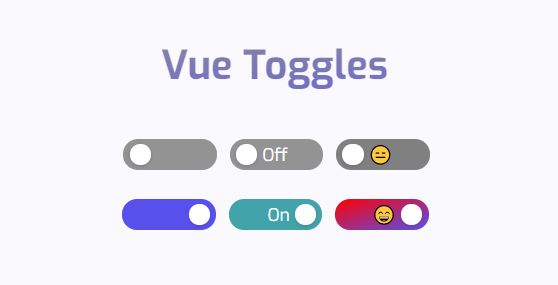
Vue Toggles comes out of the box with accessibility support for:
aria-checkeddepending on statearia-readonlyif the toggle is disabledprefers-reduced-motionif the user has requested any type of motion reduction [prefers-reduced-motion]
What's left for you, when it comes to accessibility, is labeling the toggle correctly. This is either done by:
- A
<label for="example-id">Toggle description</label>followed by the toggle component<VueToggles id="example-id" /> - Or an
aria-label, for example<VueToggles aria-label="Toggle description" />. Remember, you still need a visual text description of what the toggle does
The focus-style is also left up to you - which you shouldn't remove. If you think the default is ugly, style it yourself!
npm i vue-toggles import{VueToggles}from"vue-toggles";importtype{VueTogglesProps}from"vue-toggles";importVueToggles,{typeVueTogglesProps}from"vue-toggles";The toggle is very easy to use out of the box. The bare minimum for it to work is a @click-function and a :value-prop.
<VueToggles:value="isChecked" @click="isChecked = !isChecked" />Or if you prefer the v-model-syntax:
<VueTogglesv-model="isChecked" />You can also add more props to customize things like color and width/height.
<VueToggles:value="value" :height="30" :width="90" checkedText="On" uncheckedText="Off" checkedBg="#b4d455" uncheckedBg="lightgrey" @click="value = !value" />| Name | Type | Default | Description |
|---|---|---|---|
| value | Boolean | false | Initial state of the toggle button |
| disabled | Boolean | false | Toggle does not react on mouse or keyboard events |
| reverse | Boolean | false | Reverse toggle to Right to Left |
| width | Number | 75 | Width of the toggle in px |
| height | Number | 25 | Height of the toggle in px |
| dotColor | String | #ffffff | Color of the toggle dot |
| dotSize | Number | 0 | Dot size in px |
| checkedBg | String | #5850ec | Background color when the toggle is checked |
| uncheckedBg | String | #939393 | Background color when the toggle is unchecked |
| checkedTextColor | String | #ffffff | Text color when the toggle is checked |
| uncheckedTextColor | String | #ffffff | Text color when the toggle is unchecked |
| uncheckedText | String | "" | Optional text when the toggle is unchecked |
| checkedText | String | "" | Optional text when the toggle is checked |
| fontSize | Number | 12 | Font size in px |
| fontWeight | String | normal | Font weight |
If you're looking for Vue 2 support, the 1.1.4version is available here.