


If you have any questions or if you have anything interesting to share related to ox-hugo, feel free to do so on Discussions!
ox-hugo is an Org exporter backend that exports Org to Hugo-compatible Markdown (Blackfriday) and also generates the front-matter (in TOML or YAML format).
The ox-hugo backend extends from a parent backend ox-blackfriday.el. The latter is the one that primarily does the Blackfriday-friendly Markdown content generation. The main job of ox-hugo is to generate the front-matter for each exported content file, and then append that generated Markdown to it.
There are, though, few functions that ox-hugo.el overrides over those by ox-blackfriday.el.
See the Real World Examples section to quickly jump to sites generated using ox-hugo and their Org sources.
Before you read further, you can see below how ox-hugo translates Org to Markdown (Org on the left; exported Markdown with Hugo front-matter on the right).
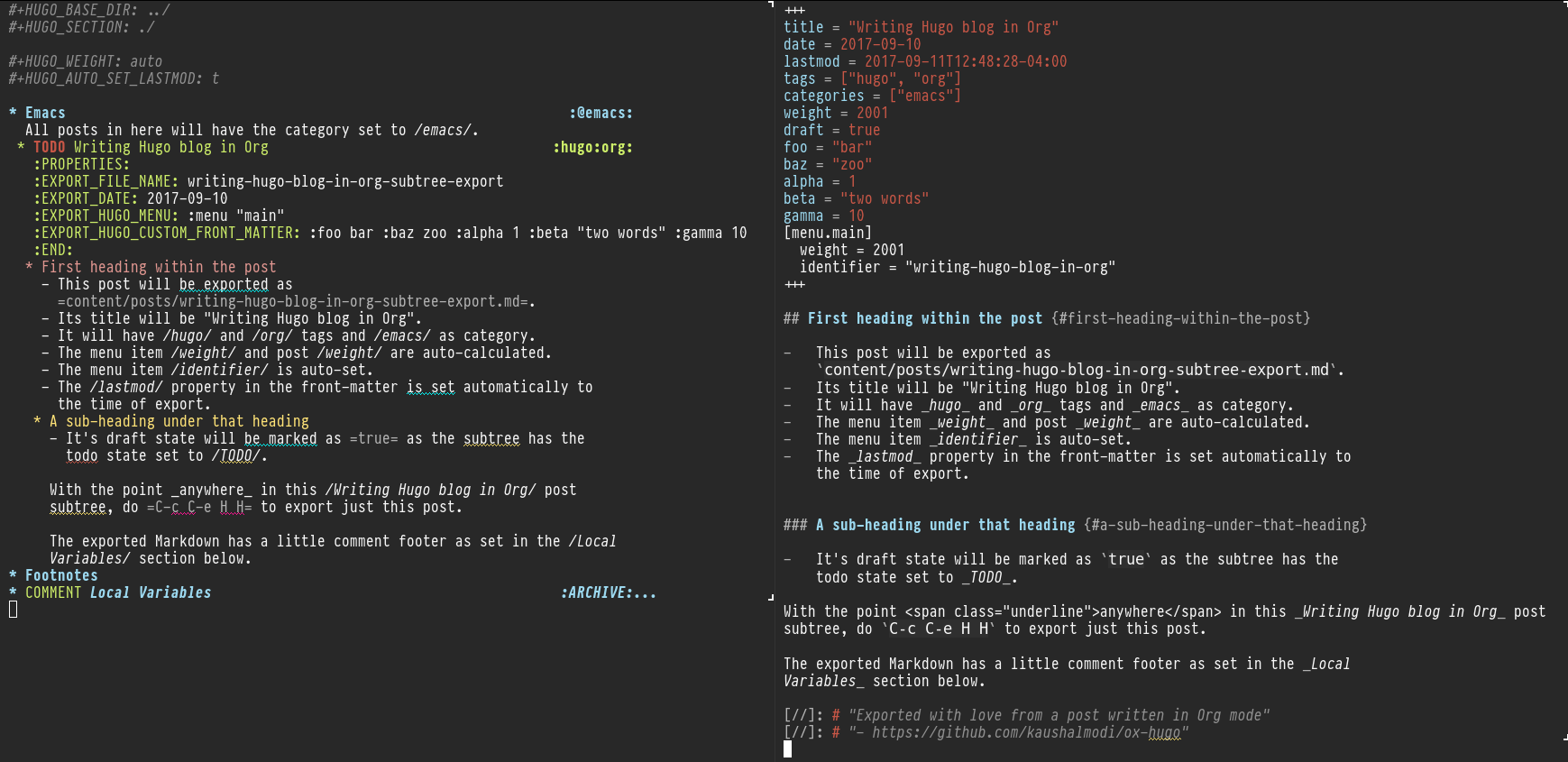
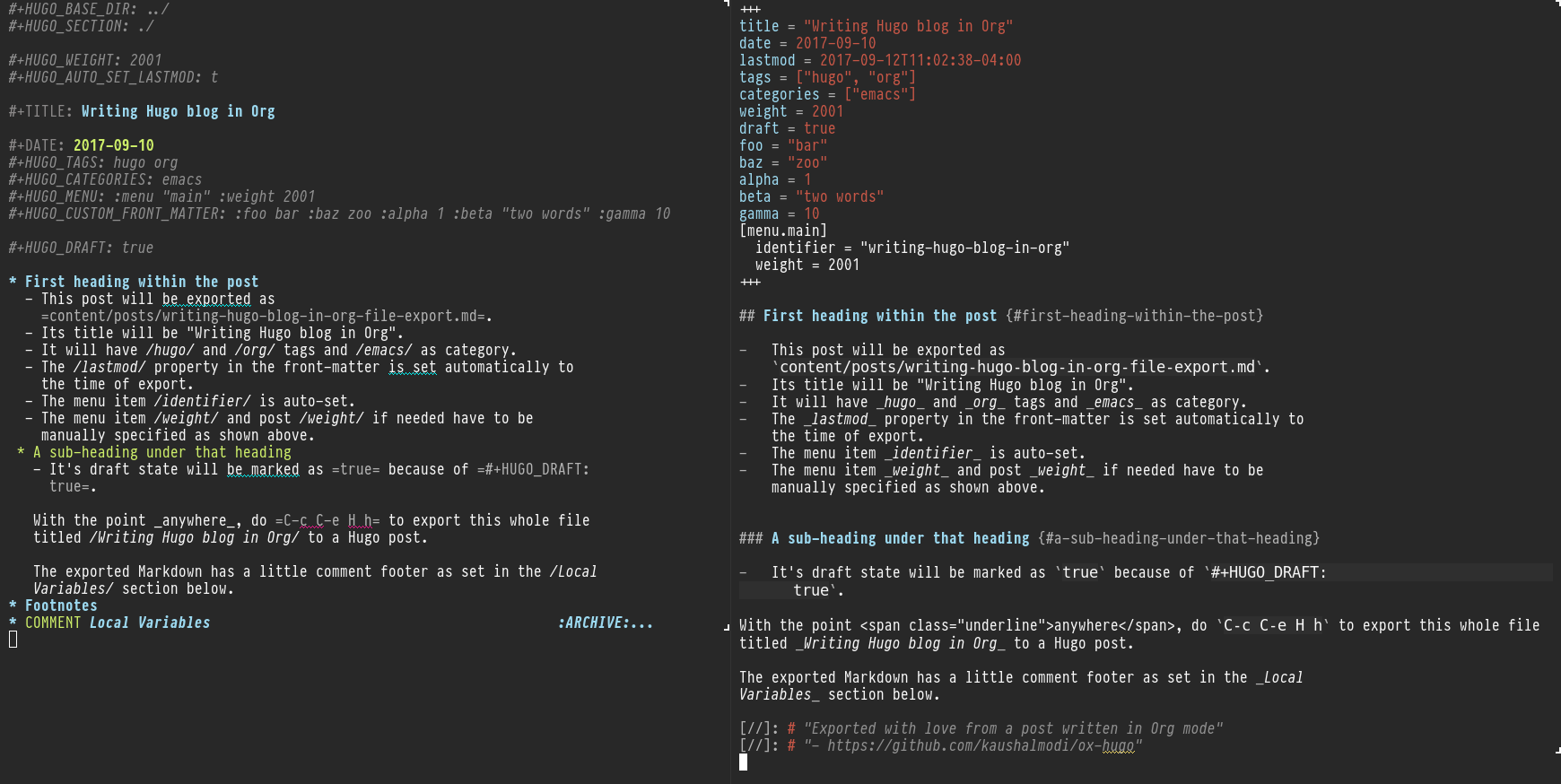
The preferred way to organize the posts is as Org subtrees (also the main reason to write this package, as nothing like that was out there) as it makes the meta-data management for Hugo front-matter pretty effortless.
If you are a one Org-file per post type of a person, that flow works too! Just note that in this flow many of those #+hugo_ properties need to be managed manually.. just as one would manage the front-matter in Markdown files — See the Org versions in the above screenshots for comparison.
ox-hugo uses itself to generate its documentation!
You can generate the same too! Simply clone this repo and do make doc_md.
Make sure you visit the above link to read more on:
- Why
ox-hugo? - Auto exporting to Markdown each time the Org file is saved
- Using Org Capture to start a new blog post
- .. and many more topics and examples
The documentation site is published by first using ox-hugo to export from Org to Markdown, and then finally hugo. So no Markdown files are committed in the =doc/content/= directory.
Org source → =ox-hugo= Exported Markdown → https://ox-hugo.scripter.co/test/
The test site uses a minimal theme written just for debug purposes (not extra aesthetics). The test site is designed to verify if all the content translates from Org to Markdown as expected.
See Hugo Themes for examples of really good site prettification and presentation styles.
This package requires at least GNU Emacs 26.3 and Org Mode 9.0. It is available on Melpa (https://melpa.org/#/ox-hugo), and it’s recommended to install this package from Melpa (_not_ Melpa Stable).
You will need to require the package after installing it to get the ox-hugo export options in the Org Export Dispatcher menu (the one you see when you hit C-c C-e to initiate any export).
You can do that by adding the below to your config:
(with-eval-after-load'ox (require'ox-hugo))If you use =use-package=, you can do the below instead:
(use-package ox-hugo :ensuret;Auto-install the package from Melpa:pinmelpa;`package-archives' should already have ("melpa" . "https://melpa.org/packages/"):after ox)Spacemacs users can use ox-hugo by setting the variable org-enable-hugo-support.
(setq-default dotspacemacs-configuration-layers '((org:variables org-enable-hugo-support t)))This was verified to work on Spacemacs =develop= branch (ref).
Before you export check that these properties are set as you need:
- HUGO_BASE_DIR
- Root directory of the source for the Hugo site. If this is set to
~/hugo/, the exported Markdown files will be saved to~/hugo/content/<HUGO_SECTION>/directory[fn:-0-section_more]. By default, the Markdown files reside in a hierarchy under thecontent/directory in the site root directory (ref).If you try to export without setting this property, you will get this error:
user-error: It is mandatory to set the HUGO_BASE_DIR property or the `org-hugo-base-dir' local variable
This property can be set by one of two ways:
- Setting the
#+hugo_base_dir:keyword in the Org file. - Setting the
org-hugo-base-dirvariable in a.dir-locals.elor File Local Variables.
- Setting the
- HUGO_SECTION
- The default Hugo section name for all the posts. See here for more information on Hugo sections. It is common for this property to be set to
postsorblog. The default value is set usingorg-hugo-default-section-directory. See Hugo Section for details.
Important: If you choose to export an Org subtree as a post, you need to set the EXPORT_FILE_NAME subtree property. That property is used by this package to figure out where the current post starts. For that reason, a subtree with =EXPORT_FILE_NAME= property cannot nest another subtree with that property. If you can analogize with the branch/leaf data structure terminlogy, then the subtrees with EXPORT_FILE_NAME property need to be leaf nodes.
[fn:-0-section_more] The HUGO_SECTION is the bare-minimum requirement to specify the destination path. That path can be further tweaked using HUGO_BUNDLE key (and the associated EXPORT_HUGO_BUNDLE property), and the EXPORT_HUGO_SECTION_FRAG property (only for per-subtree exports).
The common ox-hugo export bindings are:
C-c C-e H H- Export “What I Mean”. This is same as calling the
org-hugo-export-wim-to-mdfunction interactively or via(org-hugo-export-wim-to-md)in Emacs Lisp.- If point is in a valid Hugo post subtree, export that subtree to a Hugo post in Markdown.
A valid Hugo post subtree is an Org subtree that has the
EXPORT_FILE_NAMEproperty set. *Note that a subtree withEXPORT_FILE_NAMEproperty cannot nest a subtree with the same property set.* If you can analogize with the branch/leaf data structure terminlogy, then the subtrees withEXPORT_FILE_NAMEproperty need to be leaf nodes. - If the file is intended to be exported as a whole (i.e. has the
#+titlekeyword), export the whole Org file to a Hugo post in Markdown.
- If point is in a valid Hugo post subtree, export that subtree to a Hugo post in Markdown.
C-c C-e H A- Export all “What I Mean”. This is same as executing
(org-hugo-export-wim-to-md :all-subtrees)in Emacs Lisp.- If the Org file has one or more ‘valid Hugo post subtrees’, export them to Hugo posts in Markdown.
- If the file is intended to be exported as a whole (i.e. no ‘valid Hugo post subtrees’ at all, and has the
#+titlekeyword), export the whole Org file to a Hugo post in Markdown.
C-c C-e H h- Export the Org file to a Hugo post in Markdown. This is same as calling the
org-hugo-export-to-mdfunction interactively.
Also see the Auto Exporting section.
Do M-x customize-group, and select org-export-hugo to see the available customization options for this package.
- Matt Price (@titaniumbones)
- Puneeth Chaganti (@punchagan)
- Also thanks to
http://whyarethingsthewaytheyare.com/setting-up-the-blog/(not hyperlinking the link as it is insecure — not https),http://www.holgerschurig.de/en/emacs-blog-from-org-to-hugo/(not hyperlinking the link as it is insecure — not https) and the =goorgeous= project by Chase Adams (@chaseadamsio) for inspiration to start this project.