
支持 IJKPlayer、 Media3(EXOPlayer2)、MediaPlayer、AliPlayer,实现了多功能的视频播放器。 (请仔细阅读下方各项说明,大多数问题可在下方找到解答)。
| 类型 | 功能 |
|---|---|
| 缓存 | 边播边缓存,使用了AndroidVideoCache;Media3(ExoPlayer)使用SimpleCache。 |
| 协议 | h263\4\5、Https、concat、rtsp、hls、rtmp、crypto、mpeg等等。(ijk模式格式支持) |
| 滤镜 | 简单滤镜(马赛克、黑白、色彩过滤、高斯、模糊、模糊等等20多种)、动画、(水印、画面多重播放等)。 |
| 帧图 | 视频第一帧、视频帧截图功能,视频生成gif功能。 |
| 播放 | 列表播放、列表连续播放、重力旋转与手动旋转、视频本身rotation旋转属性、快播和慢播、网络视频加载速度。 |
| 画面 | 调整显示比例:默认、16:9、4:3、填充;播放时旋转画面角度(0,90,180,270);镜像旋转。 |
| 内核 | IJKPlayer、Media3(EXOPlayer)、MediaPlayer、AliPlayer切换、自定义内核 |
| 布局 | 全屏与非全屏两套布局切换、没有任何操作控件的纯播放支持、弹幕功能、继承自定义任何布局。 |
| 播放 | 单例播放、多个同时播放、视频列表滑动自动播放、列表切换详情页面无缝播放。 |
| 窗口 | 小窗口、多窗体下(包括桌面)的小窗口播放。 |
| 广告 | 片头广告、跳过广告支持、中间插入广告功能。 |
| 字幕 | media3(exo2)模式下支持自定增加外挂字幕。 |
| dash | media3(exo2) 模式支持dash |
| stream | 支持元数据播放 |
| 适配 16k | ex_so 适配 16K Page Size |
| openssl | 目前 arm64 使用 openssl 1.1.1w |
| FFmpeg | 目前 arm64 使用 FFmpeg 4.1.6 |
| FFmpeg | 目前 ex_so 的 arm64 支持 G711a(pcm_alaw) |
| 更多 | 暂停前后台切换不黑屏;调整不同清晰度的支持;无缝切换支持;锁定/解锁全屏点击功能;进度条小窗口预览(测试)。 |
| 自定义 | 可自定义渲染层、自定义管理层、自定义播放层(控制层)、自定义缓存层。 |







| 公众号 | 掘金 | 知乎 | CSDN | 简书 |
|---|---|---|---|---|
| GSYTech | 点我 | 点我 | 点我 | 点我 |

allprojects{repositories{... maven{url 'https://jitpack.io' } maven{url "https://maven.aliyun.com/repository/public" } } } 你可以选择下面三种的其中一种,在module下的build.gradle添加。
//完整版引入 implementation 'com.github.CarGuo.GSYVideoPlayer:gsyvideoplayer:v10.2.0' //是否需要AliPlayer模式 implementation 'com.github.CarGuo.GSYVideoPlayer:gsyvideoplayer-aliplay:v10.2.0' implementation 'com.github.CarGuo.GSYVideoPlayer:gsyvideoplayer-java:v10.2.0' //是否需要ExoPlayer模式 implementation 'com.github.CarGuo.GSYVideoPlayer:gsyvideoplayer-exo2:v10.2.0' //是否需要AliPlayer模式 implementation 'com.github.CarGuo.GSYVideoPlayer:gsyvideoplayer-aliplay:v10.2.0' //根据你的需求ijk模式的so implementation 'com.github.CarGuo.GSYVideoPlayer:gsyvideoplayer-arm64:v10.2.0' implementation 'com.github.CarGuo.GSYVideoPlayer:gsyvideoplayer-armv7a:v10.2.0' implementation 'com.github.CarGuo.GSYVideoPlayer:gsyvideoplayer-armv5:v10.2.0' implementation 'com.github.CarGuo.GSYVideoPlayer:gsyvideoplayer-x86:v10.2.0' implementation 'com.github.CarGuo.GSYVideoPlayer:gsyvideoplayer-x64:v10.2.0' A、B普通版本支持263/264/265等,对于mpeg编码会有声音无画面情况。 C 引入的so支持mpeg编码和其他补充协议,但是so包相对变大。
implementation 'com.github.CarGuo.GSYVideoPlayer:gsyvideoplayer-java:v10.2.0' //是否需要ExoPlayer模式 implementation 'com.github.CarGuo.GSYVideoPlayer:gsyvideoplayer-exo2:v10.2.0' //是否需要AliPlayer模式 implementation 'com.github.CarGuo.GSYVideoPlayer:gsyvideoplayer-aliplay:v10.2.0' //更多ijk的编码支持 implementation 'com.github.CarGuo.GSYVideoPlayer:gsyvideoplayer-ex_so:v10.2.0' 由于 Jitpack 经常存在历史包随机丢失问题,所以新增 Github Package 依赖方式,使用方式如下:
不过 github package 访问需要 token 去 access 比较麻烦,但是胜在稳定
allprojects{repositories{... maven{url 'https://maven.pkg.github.com/CarGuo/GSYVideoPlayer' // You can also use your own GitHub account and token // For convenience, I have provided a token for an infrequently used account here credentials{// your github name username = 'carsmallguo' // your github generate new token password = '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' } } maven{url "https://maven.aliyun.com/repository/public" } } } - 生成自己 token 的方式可见:https://docs.github.com/zh/authentication/keeping-your-account-and-data-secure/managing-your-personal-access-tokens
理论上就是右上角头像 - Settings - Developer Settings - Personal access tokens - tokens (classic) - Generate new token(classic)- read:packages 记得过期时间选择永久
你可以选择下面三种的其中一种,在module下的build.gradle添加。
//完整版引入 implementation 'com.shuyu:gsyvideoplayer:10.2.0' //是否需要AliPlayer模式 implementation 'com.shuyu:gsyvideoplayer-aliplay:10.2.0' implementation 'com.shuyu:gsyvideoplayer-java:10.2.0' //是否需要ExoPlayer模式 implementation 'com.shuyu:gsyvideoplayer-exo2:10.2.0' //是否需要AliPlayer模式 implementation 'com.shuyu:gsyvideoplayer-aliplay:10.2.0' //根据你的需求ijk模式的so implementation 'com.shuyu:gsyvideoplayer-armv5:10.2.0' implementation 'com.shuyu:gsyvideoplayer-armv7a:10.2.0' implementation 'com.shuyu:gsyvideoplayer-arm64:10.2.0' implementation 'com.shuyu:gsyvideoplayer-x86:10.2.0' implementation 'com.shuyu:gsyvideoplayer-x64:10.2.0' A、B普通版本支持263/264/265等,对于mpeg编码会有声音无画面情况。 C 引入的so支持mpeg编码和其他补充协议,但是so包相对变大。
implementation 'com.shuyu:gsyvideoplayer-java:10.2.0' //是否需要ExoPlayer模式 implementation 'com.shuyu:gsyvideoplayer-exo2:10.2.0' //是否需要AliPlayer模式 implementation 'com.shuyu:gsyvideoplayer-aliplay:10.2.0' //更多ijk的编码支持 implementation 'com.shuyu:gsyvideoplayer-ex_so:10.2.0' //EXOPlayer内核,支持格式更多 PlayerFactory.setPlayManager(Exo2PlayerManager.class); //系统内核模式 PlayerFactory.setPlayManager(SystemPlayerManager.class); //ijk内核,默认模式 PlayerFactory.setPlayManager(IjkPlayerManager.class); //aliplay 内核,默认模式 PlayerFactory.setPlayManager(AliPlayerManager.class); //exo缓存模式,支持m3u8,只支持exo CacheFactory.setCacheManager(ExoPlayerCacheManager.class); //代理缓存模式,支持所有模式,不支持m3u8等,默认 CacheFactory.setCacheManager(ProxyCacheManager.class); //切换渲染模式 GSYVideoType.setShowType(GSYVideoType.SCREEN_MATCH_FULL); //默认显示比例 GSYVideoType.SCREEN_TYPE_DEFAULT = 0; //16:9 GSYVideoType.SCREEN_TYPE_16_9 = 1; //4:3 GSYVideoType.SCREEN_TYPE_4_3 = 2; //全屏裁减显示,为了显示正常 CoverImageView 建议使用FrameLayout作为父布局 GSYVideoType.SCREEN_TYPE_FULL = 4; //全屏拉伸显示,使用这个属性时,surface_container建议使用FrameLayout GSYVideoType.SCREEN_MATCH_FULL = -4; /*** * SCREEN_TYPE_CUSTOM 下自定义显示比例 * @param screenScaleRatio 高宽比,如 16:9 */ public static void setScreenScaleRatio(float screenScaleRatio) //切换绘制模式 GSYVideoType.setRenderType(GSYVideoType.SUFRACE); GSYVideoType.setRenderType(GSYVideoType.GLSURFACE); GSYVideoType.setRenderType(GSYVideoType.TEXTURE); //ijk关闭log IjkPlayerManager.setLogLevel(IjkMediaPlayer.IJK_LOG_SILENT); //exoplayer自定义MediaSource ExoSourceManager.setExoMediaSourceInterceptListener(new ExoMediaSourceInterceptListener(){@Override public MediaSource getMediaSource(String dataSource, boolean preview, boolean cacheEnable, boolean isLooping, File cacheDir){//可自定义MediaSource return null} }); * 我所在的技术社区:掘金
| 文档 | 传送门 |
|---|---|
| 使用说明 | --- 简单使用,快速上手文档 |
| 建议阅读 | --- 移动开发者必知的音视频基础知识1、--- 移动开发者必知的音视频基础知识2 |
| 项目解析说明 | --- 项目解析说明、包含项目架构和解析 |
| 接口文档入口 | --- 使用说明、接口文档 - 入口 |
| 问题集锦入口 | --- 问题集锦 - 入口(大部分你遇到的问题都在这里解决) |
| 编码格式 | --- IJK so文件配置格式说明 |
| 编译自定义SO | --- IJKPlayer编译自定义SO - 入口 |
| 版本更新说明 | --- 版本更新说明 - 入口 |
| compileSdk 太高 | --- #3514 |


- update media 1.7.1
- update aliyun player
- update media 1.6.0
- fix #4078
- link 4075 fix glsurface adapter video rotate info
- 增加 exo 切换轨道
- miniSdk 21 ,compileSdk 35
- update media3 1.4.1
- update FFMpeg 4.1.6
- update openssl-1.1.1w
- support 16k page size
- fix #3999 & #3649
- fix #4014
- fix #4019
- fix #4023
- fix #4021
- update AGP
- ex_so support 16k page size
- update media3 1.4.0
- fix #4014
- fix #3999 & #3649 system mediaPlayer setSpeed cause play
- fix #3972 ListGSYVideoPlayer 轮播场景焦点未移除导致播放器状态错误
更多版本请查阅:版本更新说明
提问题前可先查阅上方文档和说明,请在Demo中复现问题。 问题说明: 1、说明那个Demo中哪个页面。 2、问题显现和重现步骤。 3、补充问题的视频流url,截图。 4、补充问题的机型,android版本。 -keep class com.shuyu.gsyvideoplayer.video.**{*} -dontwarn com.shuyu.gsyvideoplayer.video.** -keep class com.shuyu.gsyvideoplayer.video.base.**{*} -dontwarn com.shuyu.gsyvideoplayer.video.base.** -keep class com.shuyu.gsyvideoplayer.utils.**{*} -dontwarn com.shuyu.gsyvideoplayer.utils.** -keep class com.shuyu.gsyvideoplayer.player.**{*} -dontwarn com.shuyu.gsyvideoplayer.player.** -keep class tv.danmaku.ijk.**{*} -dontwarn tv.danmaku.ijk.** -keep class androidx.media3.**{*} -keep interface androidx.media3.** -keep class com.shuyu.alipay.**{*} -keep interface com.shuyu.alipay.** -keep public class * extends android.view.View{*** get*(); void set*(***); public <init>(android.content.Context); public <init>(android.content.Context, java.lang.Boolean); public <init>(android.content.Context, android.util.AttributeSet); public <init>(android.content.Context, android.util.AttributeSet, int)} 如果是阿里云播放器,可以参考它的文档( https://help.aliyun.com/document_detail/124711.html?spm=a2c4g.124711.0.0.7fa0125dkwUPoU ),需要新增一些 keep 规则:
-keep class com.alivc.**{*} -keep class com.aliyun.**{*} -keep class com.cicada.**{*} -dontwarn com.alivc.** -dontwarn com.aliyun.** -dontwarn com.cicada.** 关于自定义和出现问题的请先看问题集锦、demo、issue。 多了解一些音视频的基础常识,对容器,音视频编码,ffmpeg先做一些了解,以及mediacodec等的不同。 尽量少出现为什么别的能播的问题哟。 播放器的可自定义还是挺高的,定制请参考demo,多看源码。现在的功能有些多,demo也在不断的更新。 一些新功能和项目结构也在不断的调整。 欢迎提出问题,谢谢。 建议使用ndk过滤,详细参考 参考第四条 : 4、NDK的so支持
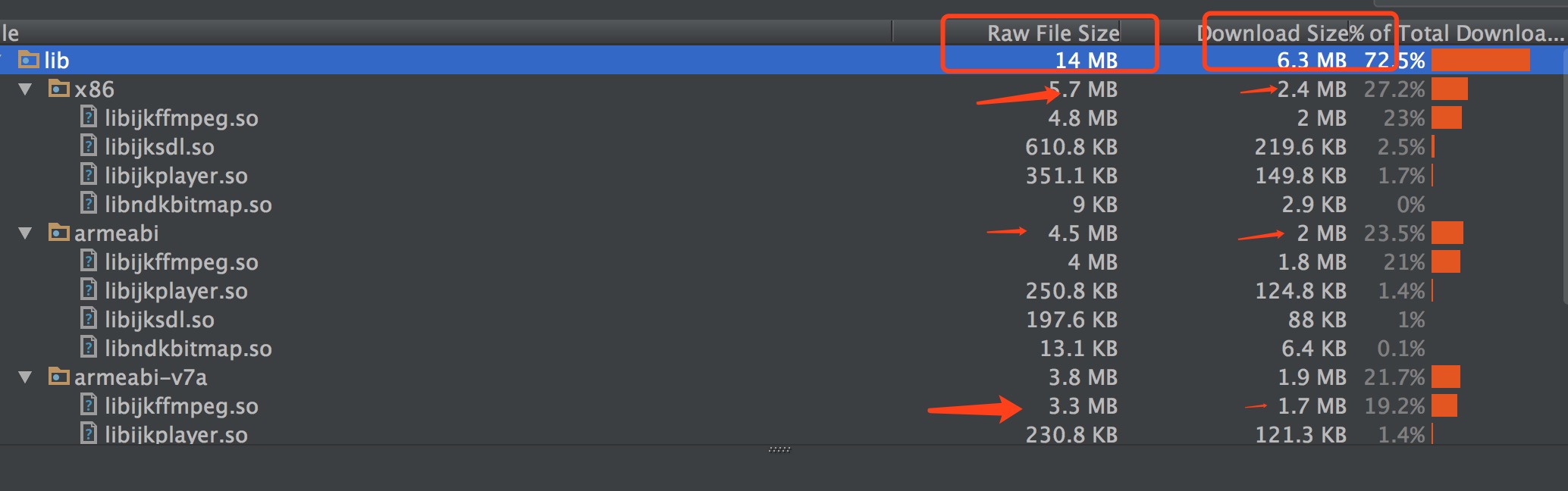
开源项目主要提供交流学习,并不提供技术支持,也不接商务合作,纯公益兴趣开源
请参看IJKPlayer和AndroidVideoCache相关协议。 项目最开始是从jiecao过来的,改着改着直接重构了。 偶尔有一变量和方法名可能还有点jiaozi的影子,但是基本是一个新项目。