Enhanced version of the original Python syntax highlighting script. Based on python.vim from Vim 7.4 distribution by Zvezdan Petkovic.
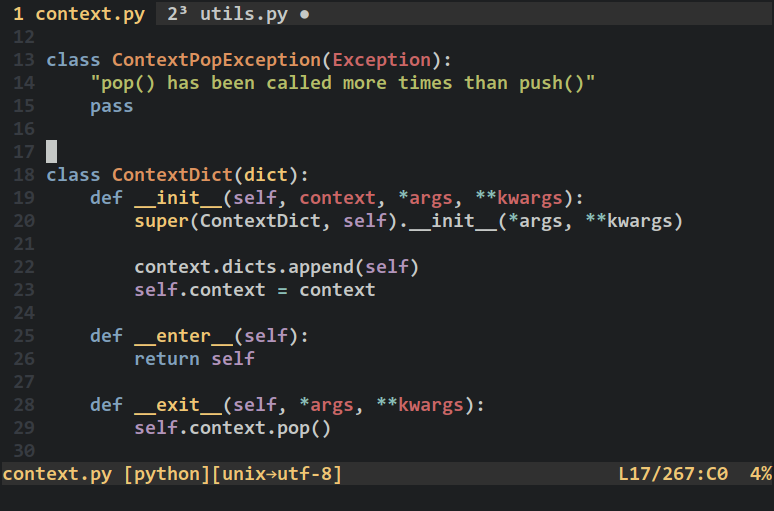
Changes from the original python.vim are:
[OFF] Highlight
self,clskeywords[ON] Highlight class, function parameters
[ON] Highlight standard operators:
~,!,^,&,|,*,/,%,+,-[ON] Highlight pseudo operators:
-=,//=,*=,&=,%=,+=,!=3 extras options:
let python_self_cls_highlight = 1let python_no_operator_highlight = 1let python_no_parameter_highlight = 1
All the options can be switched on together (recommended).
let python_highlight_all = 1
Vim keywords:
pythonRepeatpythonConditionalpythonIncludepythonTodopythonCommentpythonStatementpythonEscapepythonSpaceErrorpythonExceptionpythonExceptionspythonDoctestpythonDoctestValuepythonNumberpythonStringpythonRawStringpythonBuiltinpythonFunctionpythonClasspythonDecoratorpythonSelfpythonConstantpythonBracketspythonOperatorpythonExtraOperatorpythonExtraPseudoOperatorpythonClassParameterspythonFunctionParameters
The easiest installation method is to place syntax/python.vim script into your ~/.vim/syntax/ directory. You can also use Pathogen or Vundle plugin managers in which case you can install the whole kh3phr3n/python-syntax repository into the corresponding plugins directory.
This plugin is strongly inspired by: