Extends Typst with inline Python code for generating content and figures.
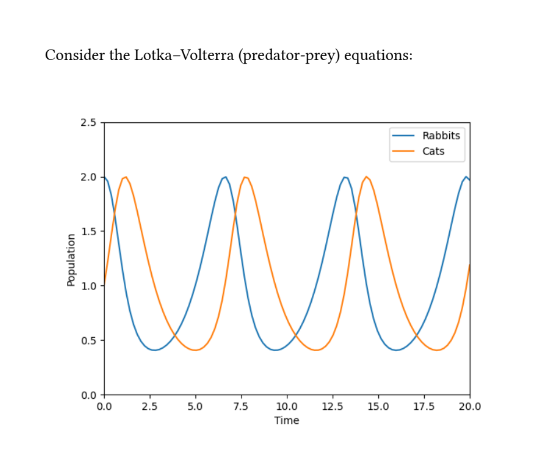
#import".typst_pyimage/pyimage.typ": pyimage Consider the Lotka--Volterra (predator-prey) equations: #pyimage("import diffraximport jax.numpy as jnpimport matplotlib.pyplot as pltdef func(t, y, args): rabbits, cats = y d_rabbits = rabbits - rabbits*cats d_cats = -cats + rabbits*cats return d_rabbits, d_catsterm = diffrax.ODETerm(func)solver = diffrax.Tsit5()y0 = (2, 1)t0 = 0t1 = 20dt0 = 0.01ts = jnp.linspace(t0, t1, 100)saveat = diffrax.SaveAt(ts=ts)sol = diffrax.diffeqsolve(term, solver, t0, t1, dt0, y0, saveat=saveat)plt.plot(ts, sol.ys[0], label='Rabbits')plt.plot(ts, sol.ys[1], label='Cats')plt.xlim(0, 20)plt.ylim(0, 2.5)plt.xlabel('Time')plt.ylabel('Population')plt.legend()", width: 70%)(This example uses JAX and Diffrax to solve an ODE.)
pip install typst_pyimage This requires that you're using Typst locally -- it won't work with the web app.
Usage is two steps. Write your content within the .typ file, and then run from the command line to build the content for Typst to actually import.
Within the .typ file:
Import like so (the .typst_pyimage/pyimage.typ file will be added in our next step):
#import".typst_pyimage/pyimage.typ": pyinit, pycontent, pyimageIt provides the following functions:
pyinit(string). The positional string should be a Python program. This will be evaluated once before allpyimageorpycontentcalls, e.g. to perform imports or other setup.pycontent(string). The positional string should be a single Python expression. When evaluated with a Pythonstr(...), the result will treated as Typst markup.pyimage(string, ..arguments) -> content. The positional string should be a Python program that creates a single matplotlib figure. Any additional..argumentsare forwarded on to Typst's built-inimagefunction. You can use it just like the normalimagefunction, e.g.#align(center, pyimage("...")).
Each pycontent or pyimage call is assumed to be a deterministic function of its string input (and that of the string passed to pyinit if it is used). The result will be cached, and only re-evaluated if that input changes.
Call from the command line:
Now it's time to run things!
To one-off compile:
python -m typst_pyimage compile your_file.typ typst compile your_file.typ To watch (run these two commands at the same time):
python -m typst_pyimage watch your_file.typ typst watch your_file.typ Python scoping rules
Each #pyinit("..."), #pycontent("...") and #pyimage("...") block is executed as a fresh module (i.e. as if each was a separate Python file), but with the same Python interpreter.
Overall, this is essentially equivalent to the following Python code:
# main.pyimportpyinitimportpyimage1importpyimage2# pyinit.py ... # your #pyinit("...") code# pyimage1.pyfrompyinitimport* ... # your first #pyimage("...") code# pyimage2.pyfrompyinitimport* ... # your second #pyimage("...") codeThis means that e.g. any global state will be shared across all #pyimage("...") calls.