📦 Archived - This repository is archived and preserved for reference only. No updates, issues, or pull requests will be accepted. If you have questions, please reach out to our support team.
Part 1:Running a scalable & reliable GraphQL endpoint with Serverless
Part 2:AppSync Backend: AWS Managed GraphQL Service
Part 3:AppSync Frontend: AWS Managed GraphQL Service
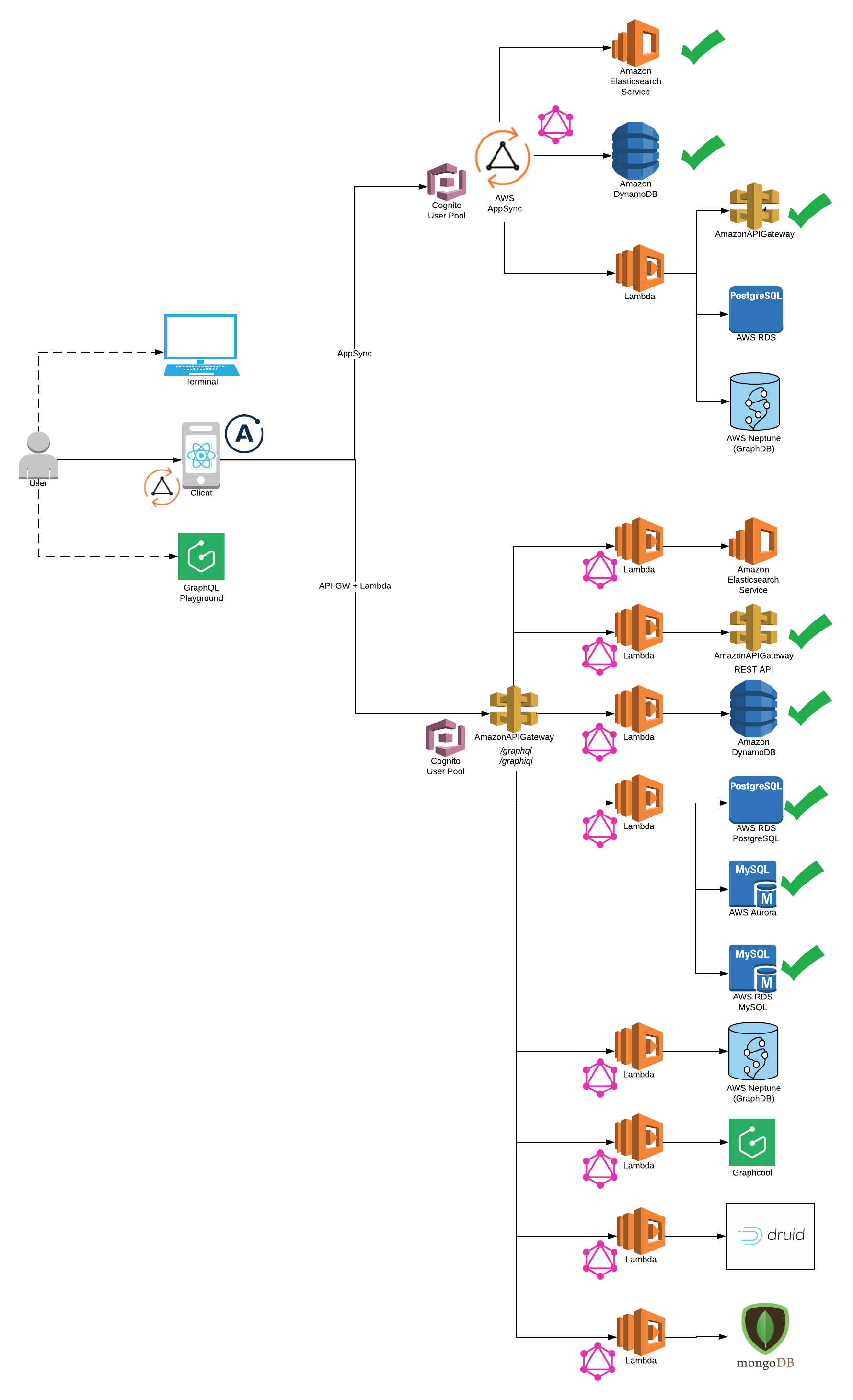
This starter kit is an opinionated set of tools combined to help you get started building a Serverless application with a GraphQL endpoint and deploy them to production in minutes.
This example uses the following technologies:
Frontend
Backend
- Serverless
- AWS AppSync DynamoDB, Elasticsearch and Lambda Integrations
- AWS Lambda & AWS API Gateway
- Apollo Server Lambda 2.0
- DynamoDB
- RDS (MySQL, PostGres and Aurora)
- REST API
- Plugins
Other Utilities and Integrations
You need to have Node 6 or higher installed.
npm install -g serverless npm install -g yarn npm install -g netlify-cli Install Dependencies.
yarn install 
Please note: AWS CLI is required to be installed on your system
- Select Backend
AWS Appsync (Serverless Offline does not support Appsync at this point)
- AWS DynamoDB
- AWS ElasticSearch
- AWS Lambda
Lambda Backend (Serverless Offline Supported)
- Twitter Rest API
cd app-backend/rest-api yarn start
Generate your Consumer Key and Secret Key for a Twitter App and update config
DynamoDB
cd app-backend/dynamodb yarn startRDS
cd app-backend/rds yarn start
- Twitter Rest API
- Start FrontEnd (Apollo Client or Appsync Client)
For Appsync Backend please select Appsync Client Integration:
cd app-client/appsync-client/ yarn startFor Lambda Backend please select Apollo Client Integration:
cd app-client/apollo-client/ yarn start
Also, please make sure GraphQL endpoint is configured correctly in config/security.env.local to run client on local.
- Start GraphiQL
http://localhost:4000/graphiql - Start GraphQL Playground (GraphiQL replacement - coming soon)
http://localhost:4000/playground rest-api and dynamodb backends route GET and POST to the same /graphql endpoint handler
http://localhost:4000/graphql - Sample Query for GraphiQL, Playground or GraphQL
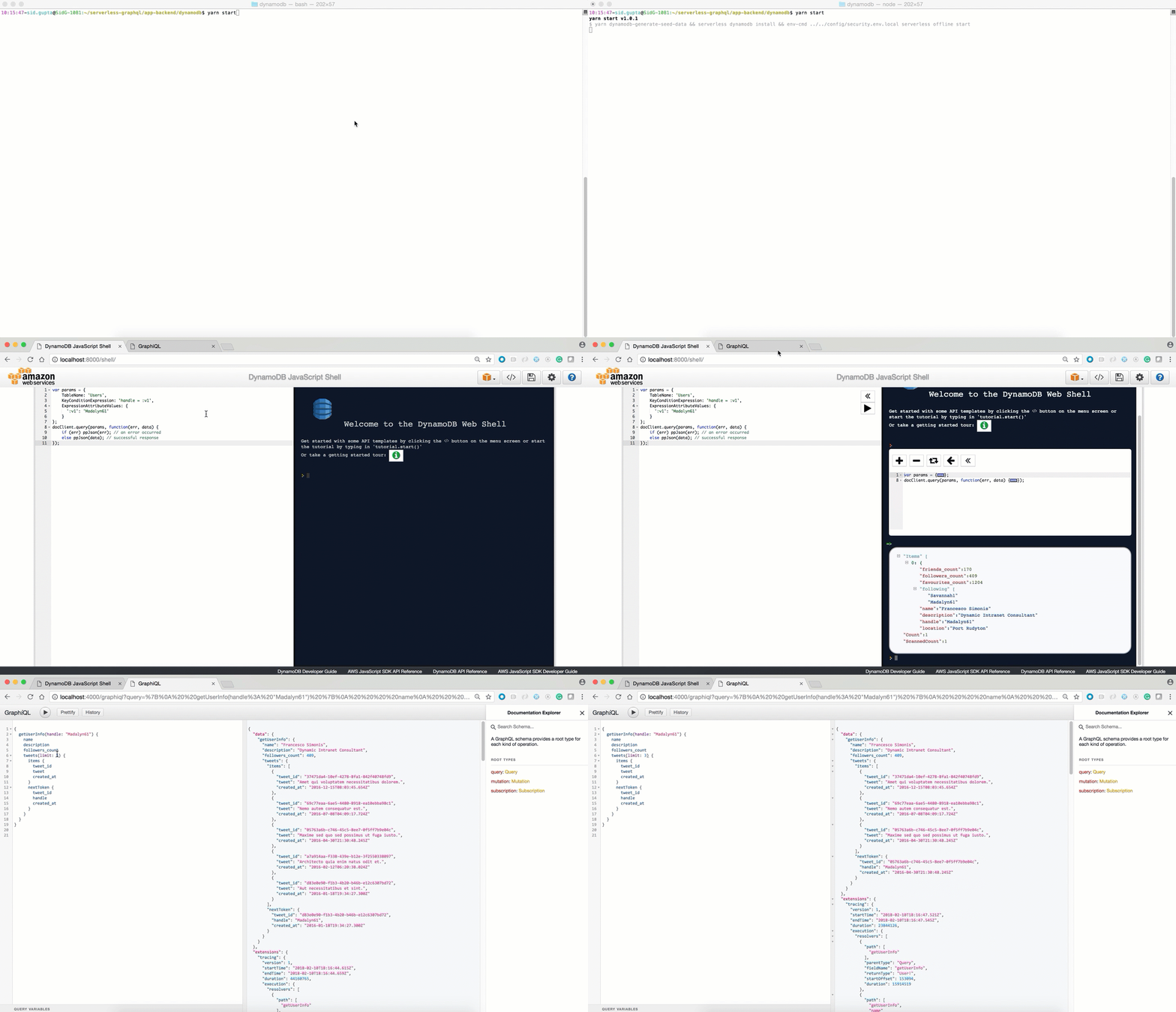
{getUserInfo(handle: "Madalyn61"){name tweets{items{retweeted retweet_count favorited tweet } } topTweet{retweeted retweet_count favorited } } } If you've followed me this far, DynamoDB will now be available and running on your local machine at http://localhost:8000/shell:
Configure your AWS keys. Here you can find a 2min walkthrough how to do retrieve the keys.
sls config credentials --provider aws --key <your_aws_access_key> --secret <your_aws_secret_key> 
You need to make sure you have access to your deployed lambda functions.
- Select Backend
- AWS Appsync (Supported by Serverless-AppSync-Plugin)
Note Please make sure latest serverless package is installed npm install -g serverless@latest
To use aws appsync you will need to create cognito user pool to authenticate the API Reference
- AWS DynamoDB cd app-backend/appsync/dynamodb yarn deploy-prod yarn deploy-appsync - AWS ElasticSearch cd app-backend/appsync/dynamo-elasticsearch-lambda yarn deploy-prod yarn deploy-appsync - AWS Lambda cd app-backend/appsync/lambda yarn deploy-prod yarn deploy-appsync Lambda Backend (Serverless Offline Supported)
Twitter Rest API
cd app-backend/rest-api yarn deploy-prodDynamoDB
cd app-backend/dynamodb yarn deploy-prodRDS
Create RDS Instance. For example - PostGres Tutorial
Please make sure connectivity to production RDS instance works (For example: test via razersql)
Edit the
config/security.env.prodfile and replace theDATABASE_URLvariable with your amazon rds endpoint (eg: postgres://${username}:{password}@${endpoint):5432/${dbName}).Run the deployment command
cd app-backend/rds yarn deploy-prod
- Config: Get your /graphql POST endpoint as shown below and use it in config/security.env.prod NOTE Please remove all quotes and <> and place only your POST endpoint url otherwise you will get 405 method not allowed error on POST to your endpoint

- Select Frontend (apollo-client or appsync-client)
Note:
- For lambda please use apollo-client
- For appsync backend please use appsync-client
- Please note that backend is deployed before deploying frontend.
- You can deploy the client on AWS S3 or Netlify.
AWS S3
First you will need to choose custom s3 bucket name for client. For ex: s3-firstname-serverless-graphql. Please note that bucket name must be unique across all aws buckets.
Now, in
app-client/<client-name>/serverless.ymledit thecustom.client.bucketNameproperty and replace it the bucket name above.Now, in
app-client/<client-name>/package.jsonedit thehomepageproperty withhttps://${yourBucketName}.s3-website-us-east-1.amazonaws.com. For ex: https://s3-bucketname-serverless-graphql.s3-website-us-east-1.amazonaws.comRun the deployment command
cd app-client/<client-name>/ yarn deploy-s3 # Your deployment url will be printed on the consoleYour deployment url will be : https://s3.amazonaws.com/[bucket-name]/index.html
Netlify
First you will need to create a new account. Please see https://www.netlify.com/docs/cli/ for details.
Remove homepage property in
app-client/<client-name>/package.json. This property is not required while deploying to netlify but is required for aws s3 deployment.The first time you use the cli tool, you’ll be asked to authenticate through the browser. After you authenticate netlify will store an access token in a global ~/.netlify/config
Run deployment command
cd app-client/<client-name>/ yarn deploy-netlify- ? No site id specified, create a new site (Y/n) Y
- ? Path to deploy? (current dir) build
Your deployment url will be printed on the console
- GraphQL Schema:
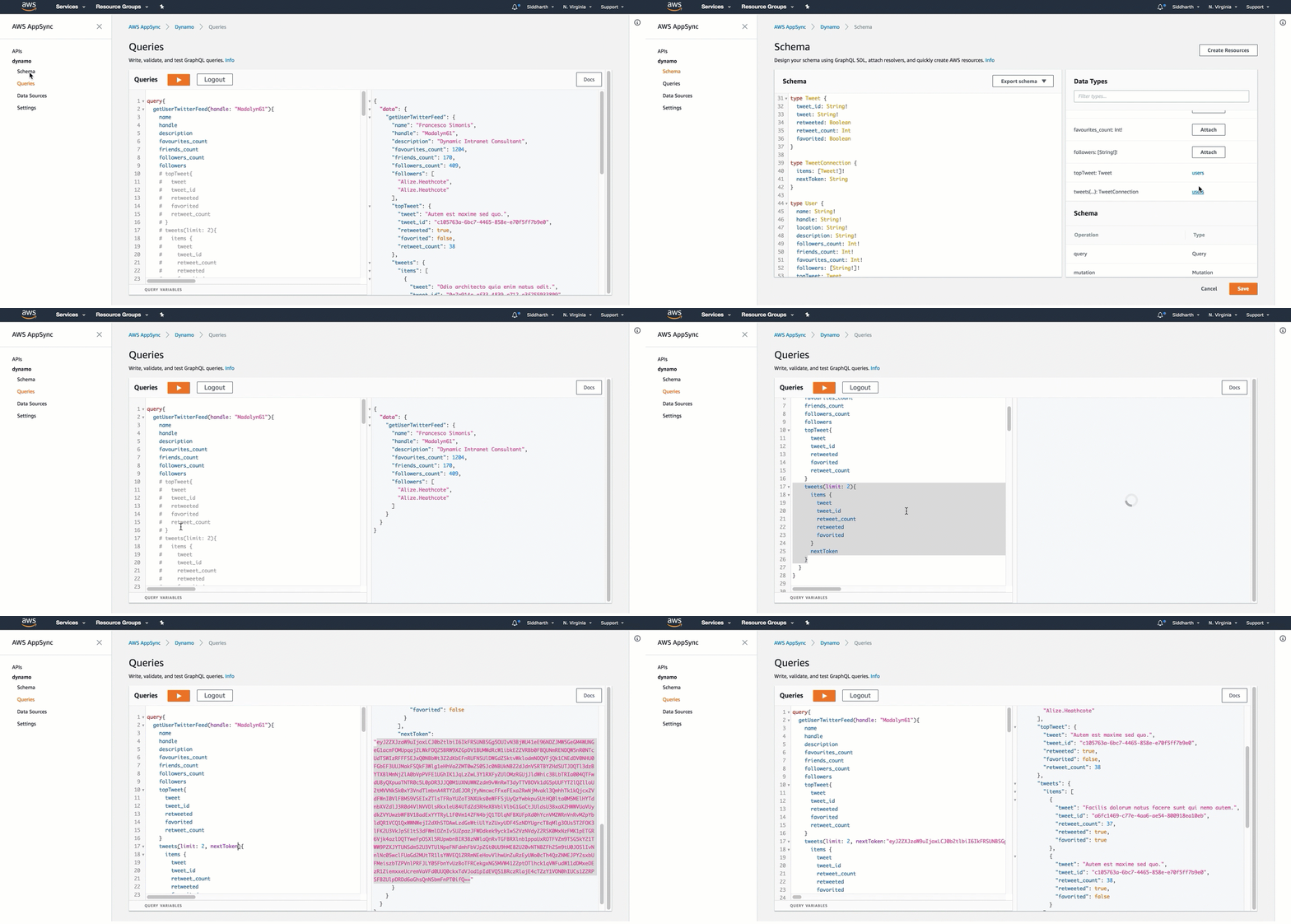
typeMutation{ # Create a tweet for a user # consumer keys and tokens are not required for dynamo integrationcreateTweet( tweet: String!, consumer_key: String, consumer_secret: String, access_token_key: String, access_token_secret: String, created_at: String! ): Tweet! # Delete User TweetdeleteTweet( tweet_id: String!, consumer_key: String, consumer_secret: String, access_token_key: String, access_token_secret: String ): Tweet! # Retweet existing TweetreTweet( tweet_id: String!, consumer_key: String, consumer_secret: String, access_token_key: String, access_token_secret: String ): Tweet! # Update existing TweetupdateTweet(tweet_id: String!, tweet: String!): Tweet! # Create user info is available in dynamo integrationupdateUserInfo( location: String!, description: String!, name: String!, followers_count: Int!, friends_count: Int!, favourites_count: Int!, followers: [String!]! ): User! } typeQuery{meInfo(consumer_key: String, consumer_secret: String): User!getUserInfo(handle: String!, consumer_key: String, consumer_secret: String): User! # search functionality is available in elasticsearch integrationsearchAllTweetsByKeyword(keyword: String!): TweetConnection } typeSubscription{addTweet: Tweet@aws_subscribe(mutations: ["createTweet"]) } typeTweet{tweet_id: String!tweet: String!retweeted: Booleanretweet_count: Intfavorited: Booleancreated_at: String! } typeTweetConnection{items: [Tweet!]!nextToken: String } typeUser{name: String!handle: String!location: String!description: String!followers_count: Int!friends_count: Int!favourites_count: Int!followers: [String!]!topTweet: Tweettweets(limit: Int!, nextToken: String): TweetConnection # search functionality is available in elasticsearch integrationsearchTweetsByKeyword(keyword: String!): TweetConnection } schema{query: Querymutation: Mutationsubscription: Subscription }- GraphQL Query:
. ├── /app-client/ # React JS Client Integrations │ ├── /appsync-client # Appsync Client Itegrations │ │ ├── /public/ # front End Utils │ │ │ ├── /index.html # main html file to render react app │ │ │ ├── /... # front end metadata │ │ ├── /src/ # react app code logic │ │ │ ├── /components/ # react components │ │ │ ├── /App.js # react application logic │ │ │ ├── /index.js # react dom render │ │ │ ├── /aws-exports.js # AWS Authentication │ │ │ ├── /... # etc. │ │ ├── /package.json # react app dependencies │ │ ├── /serverless.yml # Serverless yaml for AWS deployment │ ├── /apollo-client # Apollo Client Itegrations │ │ ├── /public/ # front End Utils │ │ │ ├── /index.html # main html file to render react app │ │ │ ├── /... # front end metadata │ │ ├── /src/ # react app code logic │ │ │ ├── /components/ # react components │ │ │ ├── /App.js # react application logic │ │ │ ├── /index.js # react dom render │ │ │ ├── /... # etc. │ │ ├── /package.json # react app dependencies │ │ ├── /serverless.yml # Serverless yaml for AWS deployment ├── /app-backend/ # Server Backend Integrations ├ ├── /appsync/ # AWS Appsync Integrations ├ ├ ├── /dynamodb/*# AWS Appsync Dynamodb ├ ├ ├── /elasticsearch/*# AWS Appsync Elasticsearch ├ ├ ├── /lambda/ # AWS Appsync Lambda │ ├── /dynamodb # Integration with DynamodDB Backend │ │ ├── /seed-data/ # seed test data │ │ │ ├── /create_seed_data.js # Create Seed data to be inserted in dynamodb local and remote │ │ │ ├── /insert_seed_data_prod.js # Insert seed data in aws dynamodb (serverless) │ │ │ ├── /sample-query.txt # Test Query on DynamoDB Local Client http://localhost:8000 │ │ ├── /handler.js # AWS Lambda - Apollo Lambda Server │ │ ├── /package.js # server side dependencies │ │ ├── /resolvers.js # graphql resolvers │ │ ├── /schema.js # graphql schema │ │ ├── /serverless.yml # Serverless yaml for AWS deployment │ │ ├── /webpack.config.js # Webpack server side code with ES6 │ ├── /rest-api # Integration with REST API Backend │ │ ├── /handler.js # AWS Lambda - Apollo Lambda Server │ │ ├── /package.js # server side dependencies │ │ ├── /resolvers.js # graphql resolvers │ │ ├── /schema.js # graphql schema │ │ ├── /serverless.yml # Serverless yaml for AWS deployment │ │ ├── /webpack.config.js # Webpack server side code with ES6 │ ├── /rds # Integrations for PostGres, MySQL and Aurora Backend │ │ ├── /seed-data/ # seed test data │ │ │ ├── /create_seed_data.js # Create Seed data to be inserted in dynamodb local and remote │ │ │ ├── /seed_local.js # Insert seed data in aws dynamodb (serverless) │ │ │ ├── /seed_prod.js # Test Query on DynamoDB Local Client http://localhost:8000 │ │ ├── /migrations/ # Create DDL statements │ │ ├── /knexfile.js # Database Configurations │ │ ├── /handler.js # AWS Lambda - Apollo Lambda Server │ │ ├── /package.js # server side dependencies │ │ ├── /resolvers.js # graphql resolvers │ │ ├── /schema.js # graphql schema │ │ ├── /serverless.yml # Serverless yaml for AWS deployment │ │ ├── /webpack.config.js # Webpack server side code with ES6 ├── /config/ # Configuration files │ ├── /security.env.local # local config │ ├── /security.env.prod # production config- Schema Stitching
- Lambda Backend: GraphCool, Druid
- Aggregations at Scale - Druid
- Lambda Backend: Authentication and Authorization
- Lambda Backend: Pagination
- Swagger Integration
- Integration with Azure, IBM and Google Coud
As the Serverless GraphQL Apollo community grows, we'd like to keep track of who is using the platform. Please send a PR with your company name and @githubhandle if you may.
Currently officially using Serverless GraphQL Apollo :