
A dead simple way to to add tooltips to your Android app.
<com.venmo.view.TooltipView android:layout_width="wrap_content"android:layout_height="wrap_content"android:layout_alignLeft="@+id/anchored_view"android:layout_alignRight="@id/anchored_view"android:padding="8dp"android:gravity="center_horizontal"android:text="Your text here!"app:tooltipColor="#66009900"app:anchoredView="@id/anchored_view" />Here are the attribute options:
app:tooltipColor="#66009900" app:anchoredView="@id/anchored_view" app:arrowWidth="120dp" app:arrowHeight="120dp" app:cornerRadius="16dp" app:arrowAlignmentOffset="32dp" app:arrowAlignment="end" app:arrowLocation="top" Screenshot: 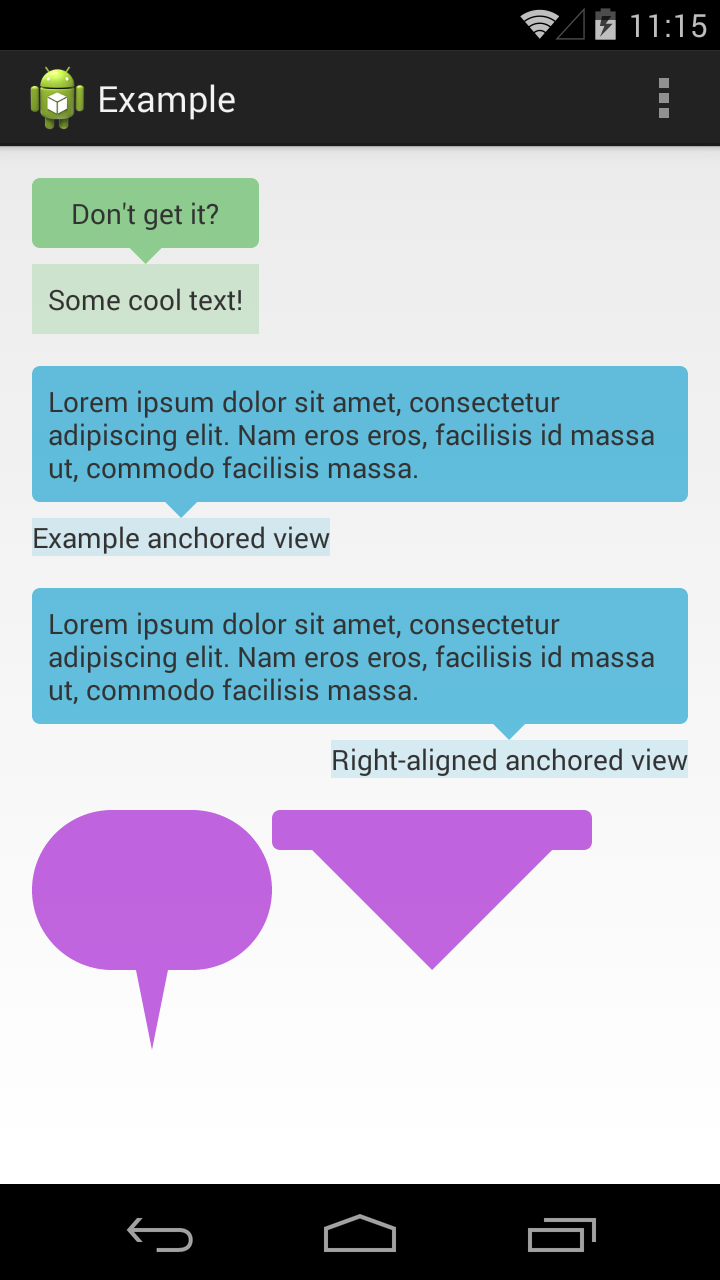
compile 'com.venmo.view.tooltip:tooltip:0.1.2@aar'- tooltips on the sides of the bubble