UniRxiOS - Reactive Extensions for Unity5.1.1 Testing iPhone6 iOS (8.1) this is not original "UniRx"
Created by Yoshifumi Kawai(neuecc) = > Editing Noboru Otsuka(whaison)


UniRx (Reactive Extensions for Unity) is a reimplementation of the .NET Reactive Extensions. The Official Rx implementation is great but doesn't work on Unity and has issues with iOS AOT compatibility. This library fixes those issues and adds some specific utilities for Unity. Supported platforms are PC/Mac/Android/iOS/WP8/WindowsStore/etc and the library is fully supported on both Unity 5 and 4.6.
UniRx is available on the Unity Asset Store (FREE) - http://u3d.as/content/neuecc/uni-rx-reactive-extensions-for-unity/7tT
Presentation - http://www.slideshare.net/neuecc/unirx-reactive-extensions-for-unityen
Support thread on the Unity Forums: Ask me any question - http://forum.unity3d.com/threads/248535-UniRx-Reactive-Extensions-for-Unity
Release Notes, see UniRx/releases
UniRx is Core Library (Port of Rx) + Platform Adaptor (MainThreadScheduler/FromCoroutine/etc) + Framework (ObservableTriggers/ReactiveProeperty/PresenterBase/etc)
Ordinarily, Network operations in Unity require the use of WWW and Coroutine. That said, using Coroutine is not good practice for asynchronous operations for the following (and other) reasons:
- Coroutines can't return any values, since its return type must be IEnumerator.
- Coroutines can't handle exceptions, because yield return statements cannot be surrounded with a try-catch construction.
This kind of lack of composability causes operations to be close-coupled, which often results in huge monolithic IEnumerators.
Rx cures that kind of "asynchronous blues". Rx is a library for composing asynchronous and event-based programs using observable collections and LINQ-style query operators.
The game loop (every Update, OnCollisionEnter, etc), sensor data (Kinect, Leap Motion, etc.) are all types of events. Rx represents events as reactive sequences which are both easily composable and support time-based operations by using LINQ query operators.
Unity is generally single threaded but UniRx facilitates multithreading for joins, cancels, accessing GameObjects, etc.
UniRx helps UI programming with uGUI. All UI events (clicked, valuechanged, etc) can be converted to UniRx event streams.
Great introduction to Rx article: The introduction to Reactive Programming you've been missing.
The following code implements the double click detection example from the article in UniRx:
var clickStream = Observable.EveryUpdate() .Where(_ => Input.GetMouseButtonDown(0)); clickStream.Buffer(clickStream.Throttle(TimeSpan.FromMilliseconds(250))) .Where(xs => xs.Count >= 2) .Subscribe(xs => Debug.Log("DoubleClick Detected! Count:" + xs.Count)); This example demonstrates the following features (in only five lines!):
- The game loop (Update) as an event stream
- Composable event streams
- Merging self stream
- Easy handling of time based operations
Use ObservableWWW for asynchronous network operations. Its Get/Post functions return subscribable IObservables:
ObservableWWW.Get("http://google.co.jp/").Subscribe( x =>Debug.Log(x.Substring(0,100)),// onSuccess ex =>Debug.LogException(ex));// onErrorRx is composable and cancelable. You can also query with LINQ expressions:
// composing asynchronous sequence with LINQ query expressionsvarquery=fromgoogleinObservableWWW.Get("http://google.com/")frombinginObservableWWW.Get("http://bing.com/")fromunknowninObservableWWW.Get(google+bing)selectnew{google,bing,unknown};varcancel=query.Subscribe(x =>Debug.Log(x));// Call Dispose is cancel.cancel.Dispose();Use Observable.WhenAll for parallel requests:
// Observable.WhenAll is for parallel asynchronous operation// (It's like Observable.Zip but specialized for single async operations like Task.WhenAll)varparallel=Observable.WhenAll(ObservableWWW.Get("http://google.com/"),ObservableWWW.Get("http://bing.com/"),ObservableWWW.Get("http://unity3d.com/"));parallel.Subscribe(xs =>{Debug.Log(xs[0].Substring(0,100));// googleDebug.Log(xs[1].Substring(0,100));// bingDebug.Log(xs[2].Substring(0,100));// unity});Progress information is available:
// notifier for progressvarprogressNotifier=newScheduledNotifier<float>();progressNotifier.Subscribe(x =>Debug.Log(x));// write www.progress// pass notifier to WWW.Get/PostObservableWWW.Get("http://google.com/",progress:progressNotifier).Subscribe();Error handling:
// If WWW has .error, ObservableWWW throws WWWErrorException to onError pipeline.// WWWErrorException has RawErrorMessage, HasResponse, StatusCode, ResponseHeadersObservableWWW.Get("http://www.google.com/404").CatchIgnore((WWWErrorExceptionex)=>{Debug.Log(ex.RawErrorMessage);if(ex.HasResponse){Debug.Log(ex.StatusCode);}foreach(variteminex.ResponseHeaders){Debug.Log(item.Key+":"+item.Value);}}).Subscribe();IEnumerator (Coroutine) is Unity's primitive asynchronous tool. UniRx integrates coroutines and IObservables. You can write asynchronious code in coroutines, and orchestrate them using UniRx. This is best way to control asynchronous flow.
// two coroutinesIEnumeratorAsyncA(){Debug.Log("a start");yieldreturnnewWaitForSeconds(1);Debug.Log("a end");}IEnumeratorAsyncB(){Debug.Log("b start");yieldreturnnewWaitForEndOfFrame();Debug.Log("b end");}// main code// Observable.FromCoroutine converts IEnumerator to Observable<Unit>.// You can also use the shorthand, AsyncA().ToObservable()// after AsyncA completes, run AsyncB as a continuous routine.// UniRx expands SelectMany(IEnumerator) as SelectMany(IEnumerator.ToObservable())varcancel=Observable.FromCoroutine(AsyncA).SelectMany(AsyncB).Subscribe();// you can stop a coroutine by calling your subscription's Dispose.cancel.Dispose();Normally, we have to use callbacks when we require a coroutine to return a value. Observable.FromCoroutine can convert coroutines to cancellable IObservable[T] instead.
// public methodpublicstaticIObservable<string>GetWWW(stringurl){// convert coroutine to IObservablereturnObservable.FromCoroutine<string>((observer,cancellationToken)=>GetWWWCore(url,observer,cancellationToken));}// IObserver is a callback publisher// Note: IObserver's basic scheme is "OnNext* (OnError | Oncompleted)?"staticIEnumeratorGetWWWCore(stringurl,IObserver<string>observer,CancellationTokencancellationToken){varwww=newUnityEngine.WWW(url);while(!www.isDone&&!cancellationToken.IsCancellationRequested){yieldreturnnull;}if(cancellationToken.IsCancellationRequested)yieldbreak;if(www.error!=null){observer.OnError(newException(www.error));}else{observer.OnNext(www.text);observer.OnCompleted();// IObserver needs OnCompleted after OnNext!}}Here are some more examples. Next is a multiple OnNext pattern.
publicstaticIObservable<float>ToObservable(thisUnityEngine.AsyncOperationasyncOperation){if(asyncOperation==null)thrownewArgumentNullException("asyncOperation");returnObservable.FromCoroutine<float>((observer,cancellationToken)=>RunAsyncOperation(asyncOperation,observer,cancellationToken));}staticIEnumeratorRunAsyncOperation(UnityEngine.AsyncOperationasyncOperation,IObserver<float>observer,CancellationTokencancellationToken){while(!asyncOperation.isDone&&!cancellationToken.IsCancellationRequested){observer.OnNext(asyncOperation.progress);yieldreturnnull;}if(!cancellationToken.IsCancellationRequested){observer.OnNext(asyncOperation.progress);// push 100%observer.OnCompleted();}}// usecaseApplication.LoadLevelAsync("testscene").ToObservable().Do(x =>Debug.Log(x))// output progress.Last()// last sequence is load completed.Subscribe();// Observable.Start is start factory methods on specified scheduler// default is on ThreadPoolvarheavyMethod=Observable.Start(()=>{// heavy method...System.Threading.Thread.Sleep(TimeSpan.FromSeconds(1));return10;});varheavyMethod2=Observable.Start(()=>{// heavy method...System.Threading.Thread.Sleep(TimeSpan.FromSeconds(3));return10;});// Join and await two other thread valuesObservable.WhenAll(heavyMethod,heavyMethod2).ObserveOnMainThread()// return to main thread.Subscribe(xs =>{// Unity can't touch GameObject from other thread// but use ObserveOnMainThread, you can touch GameObject naturally.(GameObject.Find("myGuiText")).guiText.text=xs[0]+":"+xs[1];});UniRx's default time based operations (Interval, Timer, Buffer(timeSpan), etc) use Scheduler.MainThread as their scheduler. That means most operators (excpet for Observable.Start) work on a single thread, so ObserverOn isn't needed and thread safety measures can be ignored. This is differet from the standard RxNet implementation but better suited to the Unity environment.
Scheduler.MainThread runs under Time.timeScale's influence. If you want to ignore the time scale, use Scheduler.MainThreadIgnoreTimeScale instead.
UniRx can handle MonoBehaviour events with UniRx.Triggers:
usingUniRx;usingUniRx.Triggers;// need UniRx.Triggers namespacepublicclassMyComponent:MonoBehaviour{voidStart(){// Get the plain objectvarcube=GameObject.CreatePrimitive(PrimitiveType.Cube);// Add ObservableXxxTrigger for handle MonoBehaviour's event as Observablecube.AddComponent<ObservableUpdateTrigger>().UpdateAsObservable().SampleFrame(30).Subscribe(x =>Debug.Log("cube"),()=>Debug.Log("destroy"));// destroy after 3 second:)GameObject.Destroy(cube,3f);}}Supported triggers are ObservableAnimatorTrigger, ObservableCollision2DTrigger, ObservableCollisionTrigger, ObservableDestroyTrigger, ObservableEnableTrigger, ObservableFixedUpdateTrigger, ObservableUpdateTrigger, ObservableLastUpdateTrigger, ObservableMouseTrigger, ObservableTrigger2DTrigger, ObservableTriggerTrigger, ObservableVisibleTrigger, ObservableTransformChangedTrigger, ObservableRectTransformTrigger, ObservableCanvasGroupChangedTrigger, ObservableStateMachineTrigger, ObservableEventTrigger.
These can also be handled more easily by directly subscribing to observables returned by extension methods on Component/GameObject. These methods inject ObservableTrigger automaticaly (except for ObservableEventTrigger and ObservableStateMachineTrigger):
usingUniRx;usingUniRx.Triggers;// need UniRx.Triggers namespace for extend gameObejctpublicclassDragAndDropOnce:MonoBehaviour{voidStart(){// All events can subscribe by ***AsObservablethis.OnMouseDownAsObservable().SelectMany(_ =>this.UpdateAsObservable()).TakeUntil(this.OnMouseUpAsObservable()).Select(_ =>Input.mousePosition).Subscribe(x =>Debug.Log(x));}}Previous versions of UniRx provided
ObservableMonoBehaviour. This is a legacy interface that is no longer supported. Please use UniRx.Triggers instead.
Converting to Observable is the best way to handle Unity events. If the standard triggers supplied by UniRx are not enough, you can create custom triggers. To demonstrate, here's a LongTap trigger for uGUI:
publicclassObservableLongPointerDownTrigger:ObservableTriggerBase,IPointerDownHandler,IPointerUpHandler{publicfloatIntervalSecond=1f;Subject<Unit>onLongPointerDown;float?raiseTime;voidUpdate(){if(raiseTime!=null&&raiseTime<=Time.realtimeSinceStartup){if(onLongPointerDown!=null)onLongPointerDown.OnNext(Unit.Default);raiseTime=null;}}voidIPointerDownHandler.OnPointerDown(PointerEventDataeventData){raiseTime=Time.realtimeSinceStartup+IntervalSecond;}voidIPointerUpHandler.OnPointerUp(PointerEventDataeventData){raiseTime=null;}publicIObservable<Unit>OnLongPointerDownAsObservable(){returnonLongPointerDown??(onLongPointerDown=newSubject<Unit>());}protectedoverridevoidRaiseOnCompletedOnDestroy(){if(onLongPointerDown!=null){onLongPointerDown.OnCompleted();}}}It can be used as easily as the standard triggers:
vartrigger=button.AddComponent<ObservableLongPointerDownTrigger>();trigger.OnLongPointerDownAsObservable().Subscribe();When is OnCompleted called? Subscription lifecycle management is very important to consider when using UniRx. ObservableTriggers call OnCompleted when the GameObject they are attached to is destroyed. Other static generator methods (Observable.Timer, Observable.EveryUpdate, etc...) do not stop automatically, and their subscriptions should be managed manually.
Rx provides some helper methods, such as IDisposable.AddTo which allows you to dispose of several subscriptions at once:
// CompositeDisposable is similar with List<IDisposable>, manage multiple IDisposableCompositeDisposabledisposables=newCompositeDisposable();// fieldvoidStart(){Observable.EveryUpdate().Subscribe(x =>Debug.Log(x)).AddTo(disposables);}voidOnTriggerEnter(Colliderother){// .Clear() => Dispose is called for all inner disposables, and the list is cleared.// .Dispose() => Dispose is called for all inner disposables, and Dispose is called immediately after additional Adds.disposables.Clear();}If you want to automatically Dispose when a GameObjects is destroyed, use AddTo(GameObject/Component):
voidStart(){Observable.IntervalFrame(30).Subscribe(x =>Debug.Log(x)).AddTo(this);}AddTo calls facilitate automatic Dispose. If you needs special OnCompleted handling in the pipeline, however, use TakeWhile, TakeUntil, TakeUntilDestroy and TakeUntilDisable instead:
Observable.IntervalFrame(30).TakeUntilDisable(this).Subscribe(x =>Debug.Log(x),()=>Debug.Log("completed!"));If you handle events, Repeat is an important but dangerous method. It may cause an infinite loop, so handle with care:
usingUniRx;usingUniRx.Triggers;publicclassDangerousDragAndDrop:MonoBehaviour{voidStart(){this.gameObject.OnMouseDownAsObservable().SelectMany(_ =>this.gameObject.UpdateAsObservable()).TakeUntil(this.gameObject.OnMouseUpAsObservable()).Select(_ =>Input.mousePosition).Repeat()// dangerous!!! Repeat cause infinite repeat subscribe at GameObject was destroyed.(If in UnityEditor, Editor is freezed).Subscribe(x =>Debug.Log(x));}}UniRx provides an additional safe Repeat method. RepeatSafe: if contiguous "OnComplete" are called repeat stops. RepeatUntilDestroy(gameObject/component), RepeatUntilDisable(gameObject/component) allows to stop when a target GameObject has been destroyed:
this.gameObject.OnMouseDownAsObservable() .SelectMany(_ => this.gameObject.UpdateAsObservable()) .TakeUntil(this.gameObject.OnMouseUpAsObservable()) .Select(_ => Input.mousePosition) .RepeatUntilDestroy(this) // safety way .Subscribe(x => Debug.Log(x)); All class instances provide an ObserveEveryValueChanged method, which watches for changing values every frame:
// watch position changethis.transform.ObserveEveryValueChanged(x =>x.position).Subscribe(x =>Debug.Log(x));It's very useful. If the watch target is a GameObject, it will stop observing when the target is destroyed, and call OnCompleted. If the watch target is a plain C# Object, OnCompleted will be called on GC.
Use Subject (or AsyncSubject for asynchronious operations):
publicclassLogCallback{publicstringCondition;publicstringStackTrace;publicUnityEngine.LogTypeLogType;}publicstaticclassLogHelper{staticSubject<LogCallback>subject;publicstaticIObservable<LogCallback>LogCallbackAsObservable(){if(subject==null){subject=newSubject<LogCallback>();// Publish to Subject in callbackUnityEngine.Application.RegisterLogCallback((condition,stackTrace,type)=>{subject.OnNext(newLogCallback{Condition=condition,StackTrace=stackTrace,LogType=type});});}returnsubject.AsObservable();}}// method is separatable and composableLogHelper.LogCallbackAsObservable().Where(x =>x.LogType==LogType.Warning).Subscribe();LogHelper.LogCallbackAsObservable().Where(x =>x.LogType==LogType.Error).Subscribe();In Unity5, Application.RegisterLogCallback was removed in favor of Application.logMessageReceived, so we can now simply use Observable.FromEvent.
publicstaticIObservable<LogCallback>LogCallbackAsObservable(){returnObservable.FromEvent<Application.LogCallback,LogCallback>( h =>(condition,stackTrace,type)=>h(newLogCallback{Condition=condition,StackTrace=stackTrace,LogType=type}), h =>Application.logMessageReceived+=h, h =>Application.logMessageReceived-=h);}// using UniRx.Diagnostics;// logger is threadsafe, define per class with name.staticreadonlyLoggerlogger=newLogger("Sample11");// call once at applicationinitpublicstaticvoidApplicationInitialize(){// Log as Stream, UniRx.Diagnostics.ObservableLogger.Listener is IObservable<LogEntry>// You can subscribe and output to any place.ObservableLogger.Listener.LogToUnityDebug();// for example, filter only Exception and upload to web.// (make custom sink(IObserver<EventEntry>) is better to use)ObservableLogger.Listener.Where(x =>x.LogType==LogType.Exception).Subscribe(x =>{// ObservableWWW.Post("", null).Subscribe();});}// Debug is write only DebugBuild.logger.Debug("Debug Message");// or other logging methodslogger.Log("Message");logger.Exception(newException("test exception"));// Unity's singleton UiThread Queue SchedulerScheduler.MainThreadSchedulerObserveOnMainThread()/SubscribeOnMainThread()// Global StartCoroutine runnerMainThreadDispatcher.StartCoroutine(enumerator)// convert Coroutine to IObservableObservable.FromCoroutine((observer,token)=>enumerator(observer,token));// convert IObservable to CoroutineyieldreturnObservable.Range(1,10).StartAsCoroutine();// Lifetime hooksObservable.EveryApplicationPause();Observable.EveryApplicationFocus();Observable.OnceApplicationQuit();UniRx provides a few framecount-based time operators:
| Method |
|---|
| EveryUpdate |
| EveryFixedUpdate |
| EveryEndOfFrame |
| NextFrame |
| IntervalFrame |
| TimerFrame |
| DelayFrame |
| SampleFrame |
| ThrottleFrame |
| ThrottleFirstFrame |
| TimeoutFrame |
| DelayFrameSubscription |
For example, delayed invoke once:
Observable.TimerFrame(100).Subscribe(_ =>Debug.Log("after 100 frame"));UniRx can handle UnityEvents easily. Use UnityEvent.AsObservable to subscribe to events:
publicButtonMyButton;// ---MyButton.onClick.AsObservable().Subscribe(_ =>Debug.Log("clicked"));Treating Events as Observables enables declarative UI programming.
publicToggleMyToggle;publicInputFieldMyInput;publicTextMyText;publicSliderMySlider;// On Start, you can write reactive rules for declaretive/reactive ui programmingvoidStart(){// Toggle, Input etc as Observable (OnValueChangedAsObservable is a helper providing isOn value on subscribe)// SubscribeToInteractable is an Extension Method, same as .interactable = x)MyToggle.OnValueChangedAsObservable().SubscribeToInteractable(MyButton);// Input is displayed after a 1 second delayMyInput.OnValueChangeAsObservable().Where(x =>x!=null).Delay(TimeSpan.FromSeconds(1)).SubscribeToText(MyText);// SubscribeToText is helper for subscribe to text// Converting for human readabilityMySlider.OnValueChangedAsObservable().SubscribeToText(MyText, x =>Math.Round(x,2).ToString());}For more on reactive UI programming please consult Sample12, Sample13 and the ReactiveProperty section below.
Game data often requires notification. Should we use properties and events (callbacks)? That's often too complex. UniRx provides ReactiveProperty, a lightweight property broker.
// Reactive Notification ModelpublicclassEnemy{publicReactiveProperty<long>CurrentHp{get;privateset;}publicReactiveProperty<bool>IsDead{get;privateset;}publicEnemy(intinitialHp){// Declarative PropertyCurrentHp=newReactiveProperty<long>(initialHp);IsDead=CurrentHp.Select(x =>x<=0).ToReactiveProperty();}}// ---// onclick, HP decrementMyButton.OnClickAsObservable().Subscribe(_ =>enemy.CurrentHp.Value-=99);// subscribe from notification model.enemy.CurrentHp.SubscribeToText(MyText);enemy.IsDead.Where(isDead =>isDead==true).Subscribe(_ =>{MyButton.interactable=false;});You can combine ReactiveProperties, ReactiveCollections and observables returned by UnityEvent.AsObservable. All UI elements are observable.
Generic ReactiveProperties are not serializable or inspecatble in the Unity editor, but UniRx provides specialized subclasses of ReactiveProperty that are. These include classes such as Int/LongReactiveProperty, Float/DoubleReactiveProperty, StringReactiveProperty, BoolReactiveProperty and more (Browse them here: InspectableReactiveProperty.cs). All are fully editable in the inspector. For custom Enum ReactiveProperty, it's easy to write a custom inspectable ReactiveProperty[T].
The provided derived InpsectableReactiveProperties are displayed in the inspector naturally and notify when their value is changed even when it is changed in the inspector.

This functionality is provided by InspectorDisplayDrawer. You can supply your own custom specialized ReactiveProperties by inheriting from it:
publicenumFruit{Apple,Grape}[Serializable]publicclassFruitReactiveProperty:ReactiveProperty<Fruit>{publicFruitReactiveProperty(){}publicFruitReactiveProperty(FruitinitialValue):base(initialValue){}}[UnityEditor.CustomPropertyDrawer(typeof(FruitReactiveProperty))][UnityEditor.CustomPropertyDrawer(typeof(YourSpecializedReactiveProperty2))]// and others...publicclassExtendInspectorDisplayDrawer:InspectorDisplayDrawer{}If a ReactiveProperty value is only updated within a stream, you can make it read only by using from ReadOnlyReactiveProperty.
publicclassPerson{publicReactiveProperty<string>GivenName{get;privateset;}publicReactiveProperty<string>FamilyName{get;privateset;}publicReadOnlyReactiveProperty<string>FullName{get;privateset;}publicPerson(stringgivenName,stringfamilyName){GivenName=newReactiveProperty<string>(givenName);FamilyName=newReactiveProperty<string>(familyName);// If change the givenName or familyName, notify with fullName!FullName=GivenName.CombineLatest(FamilyName,(x,y)=>x+" "+y).ToReadOnlyReactiveProperty();}}UniRx makes it possible to implement the MVP(MVRP) Pattern.

Why should we use MVP instead of MVVM? Unity doesn't provide a UI binding mechanism and creating a binding layer is too complex and loss and affects performance. Still, Views need updating. Presenters are aware of their view's components and can update them. Although there is no real binding, Observables enables subscription to notification, which can act much like the real thing. This pattern is called a Reactive Presenter:
// Presenter for scene(canvas) root.publicclassReactivePresenter:MonoBehaviour{// Presenter is aware of its View (binded in the inspector)publicButtonMyButton;publicToggleMyToggle;// State-Change-Events from Model by ReactivePropertyEnemyenemy=newEnemy(1000);voidStart(){// Rx supplies user events from Views and Models in a reactive mannerMyButton.OnClickAsObservable().Subscribe(_ =>enemy.CurrentHp.Value-=99);MyToggle.OnValueChangedAsObservable().SubscribeToInteractable(MyButton);// Models notify Presenters via Rx, and Presenters update their viewsenemy.CurrentHp.SubscribeToText(MyText);enemy.IsDead.Where(isDead =>isDead==true).Subscribe(_ =>{MyToggle.interactable=MyButton.interactable=false;});}}// The Model. All property notify when their values changepublicclassEnemy{publicReactiveProperty<long>CurrentHp{get;privateset;}publicReactiveProperty<bool>IsDead{get;privateset;}publicEnemy(intinitialHp){// Declarative PropertyCurrentHp=newReactiveProperty<long>(initialHp);IsDead=CurrentHp.Select(x =>x<=0).ToReactiveProperty();}}A View is a scene, that is a Unity hierarchy. Views are associated with Presenters by the Unity Engine on initialize. The XxxAsObservable methods make creating event signals simple, without any overhead. SubscribeToText and SubscribeToInteractable are simple binding-like helpers. These maya be simple tools, but they are very powerful. They feel natural in the Unity environment and provide high performance and a clean architecture.

V -> RP -> M -> RP -> V completely connected in a reactive way. UniRx provides all of the adaptor methods and classes, but other MVVM(or MV*) frameworks can be used instead. UniRx/ReactiveProperty is only simple toolkit.
GUI programming also benefits from ObservableTriggers. ObservableTriggers convert Unity events to Observables, so the MV(R)P pattern can be composed using them. For example, ObservableEventTrigger converts uGUI events to Observable:
vareventTrigger=this.gameObject.AddComponent<ObservableEventTrigger>();eventTrigger.OnBeginDragAsObservable().SelectMany(_ =>eventTrigger.OnDragAsObservable(),(start,current)=>UniRx.Tuple.Create(start,current)).TakeUntil(eventTrigger.OnEndDragAsObservable()).RepeatUntilDestroy(this).Subscribe(x =>Debug.Log(x));UI has hierarchy and maybe contains a few presenters. But Unity's script execution order is indeterminate in default, so you can't touch child presenter's property before child has been initialized. And sometimes ReactiveProperty requires initial value but Unity doesn't have constructor. PresenterBase solves there two problems.
- Resolve initialize dependency of multiple presenters chain
- Passing initial argument like constructor
// If Presenter receive argument inherit PresenterBase<T> otherwise inherit PresenterBasepublicclassCharacterPresenter:PresenterBase<int>{// attach from inspectorpublicWeaponPresenterWeaponPresenter;publicStatusPresenterStatusPresenter;// model fieldprivateCharactercharacter;// indicate children dependencyprotectedoverrideIPresenter[]Children{get{// If children is empty, you can write `return EmptyChildren;`returnnewIPresenter[]{WeaponPresenter,StatusPresenter};}}// This Phase is Parent -> Child// You can pass argument to children, but you can't touch child's propertyprotectedoverridevoidBeforeInitialize(intargument){varcharacterId=argument;character=newCharacter(characterId);// set up character...// Pass argument to children, call PropagateArgument methodWeaponPresenter.PropagateArgument(character.Weapon);StatusPresenter.PropagateArgument(character.Status);}// This Phase is Child -> Parent// You can touch child's property safetyprotectedoverridevoidInitialize(intargument){StatusPresenter.StatusChanged.Subscribe(x =>{WeaponPresenter.Weapon.Power.Fix(x.power);});}}PresenterBase has three phases.
- In Awake - Resolve parent-child dependency using Children proeperty.
- In Start - Perent to Children, propagete value phase.
- In Start - Children to Parent, initialize phase.

Yellow is Awake, order is indeterminate. Green is BeforeInitialize phase, its parent -> child. Red is Initialize phase, its child -> parent. This sample, you can see Sample14_PresenterBase.
If you create PresenterBase dynamically for example from Prefab, you can call ForceInitialize(argument) after instantiate.
For Visual Studio 2015 users, a custom analyzer, UniRxAnalyzer, is provided. It can, for example, detect when streams aren't subscribed to.


ObservableWWW doesn't fire until it's subscribed to, so the analyzer warns about incorrect usage. It can be downloaded from NuGet.
- Install-Package UniRxAnalyzer
Please submit new analyzer ideas on GitHub Issues!
See UniRx/Examples
The samples demonstrate how to do resource management (Sample09_EventHandling), what is the MainThreadDispatcher, among other things.
UniRx provides AotSafe utilities:
// create safety iteratorEnumerable.Range(1,10).AsSafeEnumerable().ToArray();// Wrap elements in a classEnumerable.Range(1,10).WrapValueToClass();// IEnumerable<Tuple<int>>Observable.Range(1,10).WrapValueToClass();// IObservable<Tuple<int>>Please see AOT Exception Patterns and Hacks.
If you encounter the Ran out of trampolines of type 2 error, set the AOT compilation option nimt-trampolines=2048. If you encounter the Ran out of trampolines of type 0 error, set the AOT compilation options ntrampolines=2048 as well. I recommend setting both when using UniRx.
Some interfaces, such as UniRx.IObservable<T> and System.IObservable<T>, cause conflicts when submitting to the Windows Store App. Therefore, when using NETFX_CORE, please refrain from using such constructs as UniRx.IObservable<T> and refer to the UniRx components by their short name, without adding the namespace. This solves the conflicts.
This wiki is a great way for learn Rx. All operators are illustrated with graphical marble diagrams, which makes them easy to understand.
Introduction on how to use Rx for game programming.
A great online tutorial and eBook.
The original project home page.
Many videos, slides and documents.
UniRx is an official ReacitveX family language.
Support thread on the Unity forum. Ask me any question - http://forum.unity3d.com/threads/248535-UniRx-Reactive-Extensions-for-Unity
We welcome any contributions, be they bug reports, requests or pull request.
Please consult and submit your reports or requests on GitHub issues.
Source code is available in Assets/UniRx/Scripts.
This project is using Visual Studio with UnityVS.
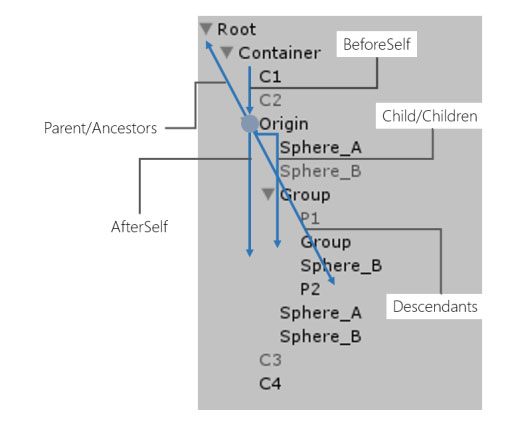
LINQ to GameObject is a group of GameObject extensions for Unity that allows traversing the hierarchy and appending GameObject to it like LINQ to XML. It's free and opensource on GitHub.
Yoshifumi Kawai(a.k.a. neuecc) is a software developer in Japan. He is the Director/CTO at Grani, Inc. Grani is a top social game developer in Japan. He was awarded Microsoft MVP for Visual C# in 2011. He is known as the creator of linq.js(LINQ to Objects for JavaScript)
Blog: http://neue.cc/ (Japanese)
Twitter: https://twitter.com/neuecc (Japanese)
This library is under the MIT License.