AutoQuery Service
This page has moved to docs.servicestack.net/autoquery-service
The next step after MemorySource in querying for even richer result-sets, whether you want to add custom validation, access multiple dependencies, construct complex queries or other custom business logic, you can use a Service Source instead which lets you call a Service and use its Response as the dynamic Data Source that you can apply Auto Querying logic on.
ServiceSource is very similar to MemorySource however instead of passing in the in-memory collection you want to query directly, you'll need to pass a Request DTO of the Service you want called instead. The response of the Service is then further queried just as if its results were passed into a MemorySource directly.
We'll illustrate with a few examples how to register and use ServiceSources, explore some of their capabilities and provide some examples of when you may want to use them below.
The UserLogin ServiceSource shows you can just pass an empty Request DTO as-is to execute its Service. The RockstarAlbum and GithubRepo Service Sources are however leveraging the built-in Auto Mapping to copy any matching properties from the AutoQuery Request DTO to the downstream GetRockstarAlbums and GetGithubRepos Request DTO's. Finally the responses for the GithubRepo Service is cached for 5 minutes so any subsequent matching requests end up querying the cached result set instead of re-executing the GetGithubRepos Service:
Plugins.Add(newAutoQueryDataFeature{MaxLimit=100}.AddDataSource(ctx =>ctx.ServiceSource<UserLogin>(newGetTodaysUserActivity())),.AddDataSource(ctx =>ctx.ServiceSource<RockstarAlbum>(ctx.Dto.ConvertTo<GetRockstarAlbums>())),.AddDataSource(ctx =>ctx.ServiceSource<GithubRepo>(ctx.Dto.ConvertTo<GetGithubRepos>(),HostContext.Cache,TimeSpan.FromMinutes(5))););The implementation of GetTodaysUserActivity Service uses an async OrmLite RDBMS call to get all User Logins within the last day, fetches the Live Activity data from Redis, then merges the disconnected POCO result sets into the UserLogin POCO which it returns:
[Route("/useractivity/today")]publicclassQueryTodaysUserActivity:QueryData<User>{}publicasyncTask<List<UserLogin>>Any(GetTodaysUserActivityrequest){varlogins=awaitDb.SelectAsync<UserLogin>(x =>x.LastLogin>=DateTime.UtcNow.AddDays(-1));varactivities=Redis.As<Activity>().GetAll();logins.Merge(activities);returnlogins;}The GetRockstarAlbums Service shows an example of a calling an existing ad hoc DB Service executing an arbitrary custom Query. It uses the Request DTO Auto-Mapping at the ServiceSource registration to first copy any matching properties from the initial QueryRockstarAlbums Request DTO to populate a new GetRockstarAlbums instance which is what's used to execute the Service with.
In this way the QueryRockstarAlbums AutoQuery Service is essentially decorating the underlying GetRockstarAlbums Service giving it access to AutoQuery features where clients are able to apply further post-querying server logic to an existing Service implementation which now lets them filter, sort, select only a partial list of fields, include additional aggregate queries, etc.
publicclassQueryRockstarAlbums:QueryData<RockstarAlbum>{publicstringName{get;set;}publicint[]IdBetween{get;set;}}publicobjectAny(GetRockstarAlbumsrequest){varq=Db.From<RockstarAlbum>();if(request.IdBetween!=null)q.Where(x =>x.Id>=request.IdBetween[0]&&x.Id<=request.IdBetween[1]);if(request.Name!=null)q.Where(x =>x.Name==request.Name);returnnewGetRockstarAlbumsResponse{Results=Db.Select(q)};}One thing to notice is that ServiceSource still works whether the results are wrapped in a Response DTO instead of a naked IEnumerable<RockstarAlbum> collection. This is transparently supported as ServiceSource will use the first matching IEnumerable<T> property for Services that don't return a collection.
It should be noted that decorating an existing OrmLite Service is rarely necessary as in most cases you'll be able to get by with just a simple AutoQuery RDBMS query as seen in the Service below which replaces the above 2 Services:
publicclassQueryRockstarAlbums:QueryDb<RockstarAlbum>{}The final GetGithubRepos ServiceSource example shows an example of a slightly more complex implementation than a single 3rd Party API call where it adds custom validation logic and call different 3rd Party API Endpoints depending on user input:
publicclassQueryGithubRepo:QueryData<GithubRepo>{publicstringUser{get;set;}publicstringOrganization{get;set;}}publicobjectGet(GetGithubReposrequest){if(request.User==null&&request.Organization==null)thrownewArgumentNullException("User");varurl=request.User!=null?"https://api.github.com/users/{0}/repos".Fmt(request.User):"https://api.github.com/orgs/{0}/repos".Fmt(request.Organization);returnurl.GetJsonFromUrl(requestFilter:req =>req.UserAgent=GetType().Name).FromJson<List<GithubRepo>>();}A hidden feature ServiceSources are naturally able to take advantage of due to its behind-the-scenes usage of the new Service Gateway is that the exact code above could still function if the QueryGithubRepo AutoQuery Data Service and underlying GetGithubRepos Service were moved to different hosts :)
Just like you can Create a Custom implementation in AutoQuery, you can do the same in AutoQuery Data by just defining an implementation for your AutoQuery Data Request DTO. But instead of IAutoQueryDb you'd reference the IAutoQueryData dependency to construct and execute your custom AutoQuery Data query.
When overriding the default implementation of an AutoQuery Data Service you also no longer need to register a Data Source as you can specify the Data Source in-line when calling AutoQuery.CreateQuery().
For our custom AutoQuery Data implementation we'll look at creating a useful Service which reads the daily CSV Request and Error Logs from the new CsvRequestLogger and queries it by wrapping the POCO RequestLogEntry results into a MemoryDataSource:
[Route("/query/requestlogs")][Route("/query/requestlogs/{Date}")]publicclassQueryRequestLogs:QueryData<RequestLogEntry>{publicDateTime?Date{get;set;}publicboolViewErrors{get;set;}}publicclassCustomAutoQueryDataServices:Service{publicIAutoQueryDataAutoQuery{get;set;}publicobjectAny(QueryRequestLogsquery){vardate=query.Date.GetValueOrDefault(DateTime.UtcNow);varlogSuffix=query.ViewErrors?"-errors":"";varcsvLogsFile=VirtualFileSources.GetFile("requestlogs/{0}-{1}/{0}-{1}-{2}{3}.csv".Fmt(date.Year.ToString("0000"),date.Month.ToString("00"),date.Day.ToString("00"),logSuffix));if(csvLogsFile==null)throwHttpError.NotFound("No logs found on "+date.ToShortDateString());varlogs=csvLogsFile.ReadAllText().FromCsv<List<RequestLogEntry>>();varq=AutoQuery.CreateQuery(query,Request,db:newMemoryDataSource<RequestLogEntry>(logs,query,Request));returnAutoQuery.Execute(query,q);}}This Service now lets you query the Request Logs of any given day, letting you filter, page and sort through the Request Logs of the day. While we're at it, let's also create multiple Custom AutoQuery Data implementations to act as canonical smart links for the above Service:
[Route("/logs/today")]publicclassTodayLogs:QueryData<RequestLogEntry>{}[Route("/logs/today/errors")]publicclassTodayErrorLogs:QueryData<RequestLogEntry>{}[Route("/logs/yesterday")]publicclassYesterdayLogs:QueryData<RequestLogEntry>{}[Route("/logs/yesterday/errors")]publicclassYesterdayErrorLogs:QueryData<RequestLogEntry>{}The implementations of which just delegates to QueryRequestLogs with the selected Date and whether or not to show just the error logs:
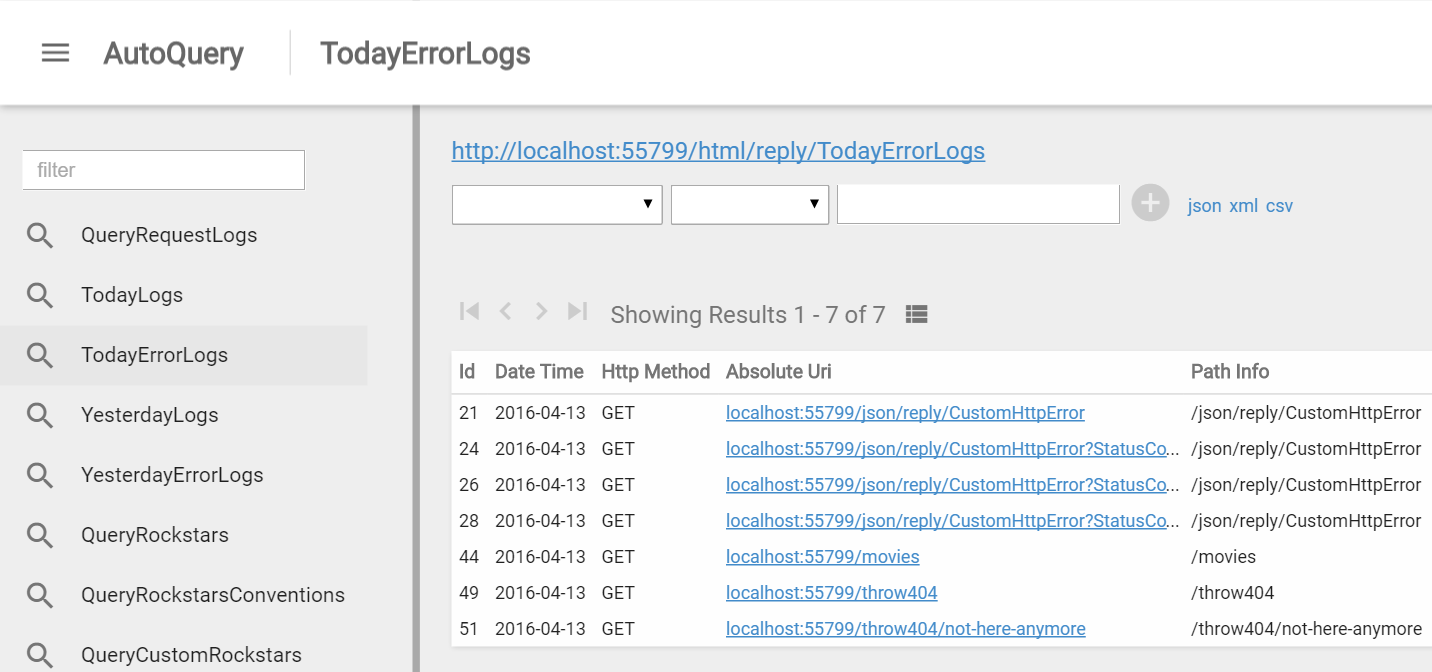
publicobjectAny(TodayLogsrequest)=>Any(newQueryRequestLogs{Date=DateTime.UtcNow});publicobjectAny(TodayErrorLogsrequest)=>Any(newQueryRequestLogs{Date=DateTime.UtcNow,ViewErrors=true});publicobjectAny(YesterdayLogsrequest)=>Any(newQueryRequestLogs{Date=DateTime.UtcNow.AddDays(-1)});publicobjectAny(YesterdayErrorLogsrequest)=>Any(newQueryRequestLogs{Date=DateTime.UtcNow.AddDays(-1),ViewErrors=true});View Request Logs in AutoQuery Viewer
And with no more effort we can jump back to /ss_admin/ and use AutoQuery Viewer's nice UI to quickly inspect Todays and Yesterdays Request and Error Logs :)